


Accounting Workflow Management Software: How to Improve Efficiency in Accounting Firms
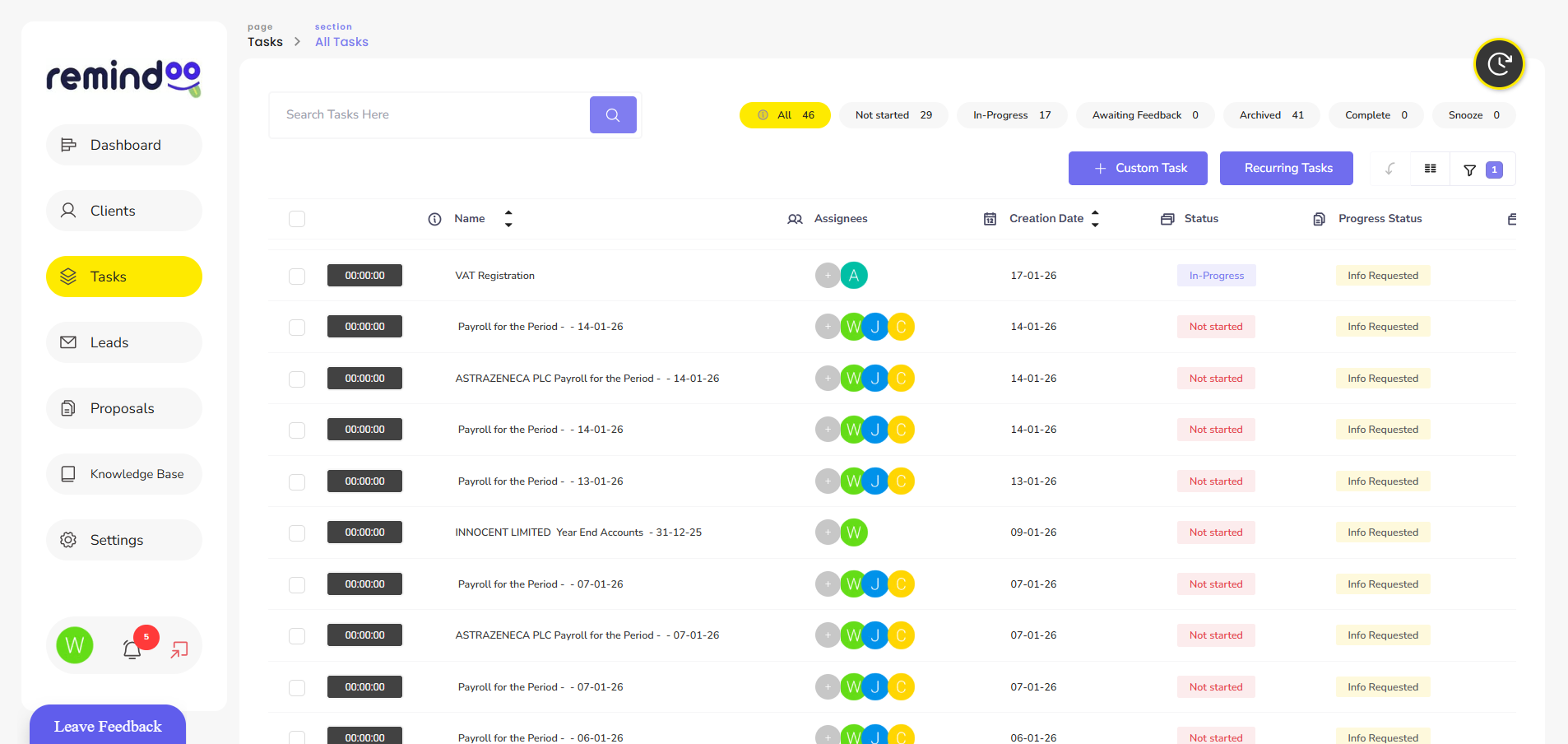
Accounting firms handle numerous responsibilities throughout the year, from bookkeeping and payroll to VAT returns, annual accounts and tax compliance. Each service involves multiple tasks, deadlines, client communications and internal reviews. Managing these activities manually can create administrative pressure and increase the risk of missed deadlines.
As accounting practices grow, maintaining consistent processes becomes increasingly important. Accounting workflow management software helps firms organise their work, allocate responsibilities, monitor progress and manage recurring client services through a centralised system.
Rather than relying on spreadsheets, email reminders and separate task lists, accounting teams can use workflow technology to establish more structured working processes.
What Is Accounting Workflow Management Software?
Accounting workflow management software is a digital system that helps accounting firms plan, organise and monitor their internal and client-related work.
It provides a structured way to manage tasks from creation through to completion. Managers can assign responsibilities, establish deadlines, track progress and review outstanding work.
Depending on the platform, common capabilities include:
-
Task creation and assignment
-
Recurring task scheduling
-
Deadline tracking and reminders
-
Client information management
-
Document requests and sharing
-
Workflow templates and automation
-
Team workload monitoring
-
Performance reporting
These features help accounting practices maintain visibility over their workload and reduce the administrative effort involved in coordinating different services.
Why Do Accounting Firms Need Better Workflow Management?
Accounting work often follows recurring cycles. VAT returns, payroll processing, bookkeeping and year-end accounts require repeated activities for different clients.
When these processes depend heavily on manual reminders and individual employees remembering what needs to happen, important tasks can become difficult to track.
A structured workflow provides several advantages.
1. Better Organisation of Client Work
Every client has different services, deadlines and information requirements. A centralised workflow system helps firms organise these responsibilities without maintaining separate task lists for every employee.
For example, a VAT return workflow might include:
-
Requesting financial records from the client.
-
Collecting and reviewing relevant documents.
-
Recording and reconciling transactions.
-
Preparing the VAT return.
-
Completing an internal review.
-
Submitting the return through the appropriate filing software.
-
Recording completion and updating the client.
Breaking larger jobs into smaller tasks makes responsibilities clearer and helps employees understand what needs to happen next.
2. More Consistent Recurring Processes
Many accounting services follow predictable schedules. Firms regularly perform similar activities for different clients, which makes recurring workflows particularly useful.
Instead of recreating tasks every month or quarter, practices can establish reusable templates.
For example, a payroll workflow could include collecting employee changes, checking payroll information, processing payments, reviewing payroll reports and completing the relevant reporting activities.
Consistent processes help reduce variations in how work is completed and make it easier to maintain internal quality standards.
3. Improved Deadline Management
Accounting practices work with multiple statutory and internal deadlines. Missing a deadline can create additional work for employees and potentially lead to penalties for clients.
Workflow management software can help firms record important dates, allocate work in advance and send reminders when tasks approach their deadlines.
Internal deadlines are also useful. For example, an accounting practice could set a review date before the final client submission date. This gives managers time to check outstanding information and address problems.
However, software reminders should complement proper planning and professional oversight rather than replace them.
How Automation Reduces Repetitive Administrative Work
Automation can reduce the need to create and assign the same tasks repeatedly.
For example, a practice providing monthly bookkeeping services to several clients can use predefined workflows to generate recurring tasks according to each client's service schedule.
When a task is created, the system can assign responsibilities, establish deadlines and provide relevant instructions.
This allows employees to spend less time organising routine work and more time completing activities that require professional judgement.
Automation can also support client communication. Scheduled reminders and document requests can help practices follow up when information is missing.
The objective is not to automate every accounting activity. Instead, firms should identify repetitive administrative processes that can be standardised without compromising accuracy or professional review.
Centralised Client Management and Communication
Client information is often spread across emails, spreadsheets, documents and separate business systems. This can make it difficult for employees to find the latest information or understand the history of a particular job.
Integrating client management with workflow tools can provide a more organised approach.
A central client record may include:
-
Client contact information
-
Services provided
-
Assigned team members
-
Important deadlines
-
Outstanding tasks
-
Engagement information
-
Communication history
-
Relevant documents
A client portal can further improve communication by giving clients a dedicated place to access shared documents, respond to requests and review outstanding requirements.
Keeping communication connected to client records also makes it easier for colleagues to understand previous interactions.
Managing Team Responsibilities and Workload
Accounting firms need to distribute work according to employee availability, experience and responsibilities.
Without a clear allocation system, some employees may become overloaded while others have available capacity.
Workflow management software can help managers see which tasks are assigned, completed, overdue or awaiting attention.
Workload reporting can also help identify recurring bottlenecks. For example, if several jobs regularly remain at the review stage, managers can investigate whether additional review capacity or improved processes are required.
Clear task ownership is particularly important when employees are absent or responsibilities change. Documented workflows allow other team members to understand what remains outstanding and continue the work.
Choosing the Right Software for an Accounting Practice
Not every workflow platform is designed around the requirements of an accounting firm. Before choosing a solution, practice owners should consider the following features.
Task and deadline management: The platform should allow employees to create, assign, track and complete tasks with clear deadlines.
Recurring workflows: Firms should be able to establish reusable processes for regular services such as VAT, payroll and bookkeeping.
Client management: Client records should connect with services, tasks and relevant deadlines.
Team collaboration: Employees should be able to communicate about assigned work and understand their responsibilities.
Reporting and analytics: Managers should have access to useful information about workload, overdue tasks, employee capacity and overall practice activity.
Integration and usability: The system should work effectively alongside the accounting tools the practice already uses and should be straightforward for employees to adopt.
Security and access permissions should also be considered because accounting firms handle confidential client and financial information.
How Remindoo Supports Accounting Workflow Management
Remindoo is a practice management platform developed for UK accountants and bookkeepers. It brings client management, task organisation, recurring workflows, deadlines and team communication into one connected workspace.
Its workflow capabilities help practices establish repeatable processes for services such as bookkeeping, VAT and payroll.
For example, a firm can create service templates, schedule recurring tasks, allocate responsibilities and use reminders to keep work moving. Teams can also use subtasks and estimated time allocations to organise more complex assignments.
Remindoo includes additional features such as:
-
Task management: Create, assign and monitor client-related work.
-
Client management: Maintain centralised client records and service information.
-
Workflow automation: Generate recurring tasks using service templates and trigger dates.
-
Client portal: Share documents and manage client requests.
-
Email management: Connect client communication with relevant work.
-
Analytics and dashboards: Monitor workloads, deadlines and team activity.
By connecting these activities, Remindoo provides accounting practices with a structured way to coordinate their daily operations.
The platform focuses on practice management and workflow coordination. It does not replace specialist accounting or tax-filing software, so firms should continue using appropriate systems for preparing and submitting returns.
The Relationship Between Workflow Software and Making Tax Digital
Digital record-keeping and workflow management are related but serve different purposes.
Making Tax Digital (MTD) requires relevant businesses to use compatible software for applicable digital record-keeping and reporting obligations.
For example, HMRC explains that businesses within Making Tax Digital for Income Tax must use compatible software to create and store digital records and submit quarterly updates.
Accounting firms should therefore distinguish between software that manages internal practice operations and software that meets specific HMRC submission requirements.
For official guidance, see GOV.UK: Choose the right software for Making Tax Digital for Income Tax.
Choosing suitable systems for both functions can help practices organise their internal work while maintaining the necessary digital processes for tax compliance.
Practical Steps for Implementing Workflow Management Software
Introducing new software requires more than creating an account and transferring existing tasks. Firms should establish a clear implementation process.
1. Review existing processes
Identify how the practice currently manages client work, recurring services, deadlines and communication. Look for duplicated activities and unnecessary manual steps.
2. Prioritise important workflows
Start with frequently repeated services such as bookkeeping, VAT and payroll. These processes often provide useful opportunities to introduce standardised task templates.
3. Assign clear responsibilities
Define who is responsible for each task, who reviews completed work and who manages client communication.
4. Organise client information
Ensure relevant client records, service details and deadlines are accurate before relying on the system for daily work.
5. Train employees
Provide practical guidance so team members understand how to create tasks, update progress, manage deadlines and communicate through the platform.
6. Review performance
Monitor overdue tasks, workload distribution and recurring delays. Use this information to improve workflows as the practice develops.
Conclusion
Efficient workflow management is an important part of running a modern accounting practice. As firms manage more clients and recurring services, manual systems can make it harder to coordinate employees, monitor deadlines and maintain consistent processes.
Accounting workflow management software provides a structured way to organise tasks, automate repetitive activities, improve client communication and monitor team responsibilities.
Platforms such as Remindoo demonstrate how practice management technology can bring these activities together in one workspace. By selecting suitable tools and establishing clear processes, accounting firms can improve operational organisation and create a more manageable approach to delivering client services.

 English
 Arabic
 French
 Spanish
 Portuguese
 Deutsch
 Turkish
 Dutch
 Russian
 Romaian
 Portuguese (Brazil)
 Greek