
Task Management Software for Accountants: A Practical Guide to Managing Practice Workflows
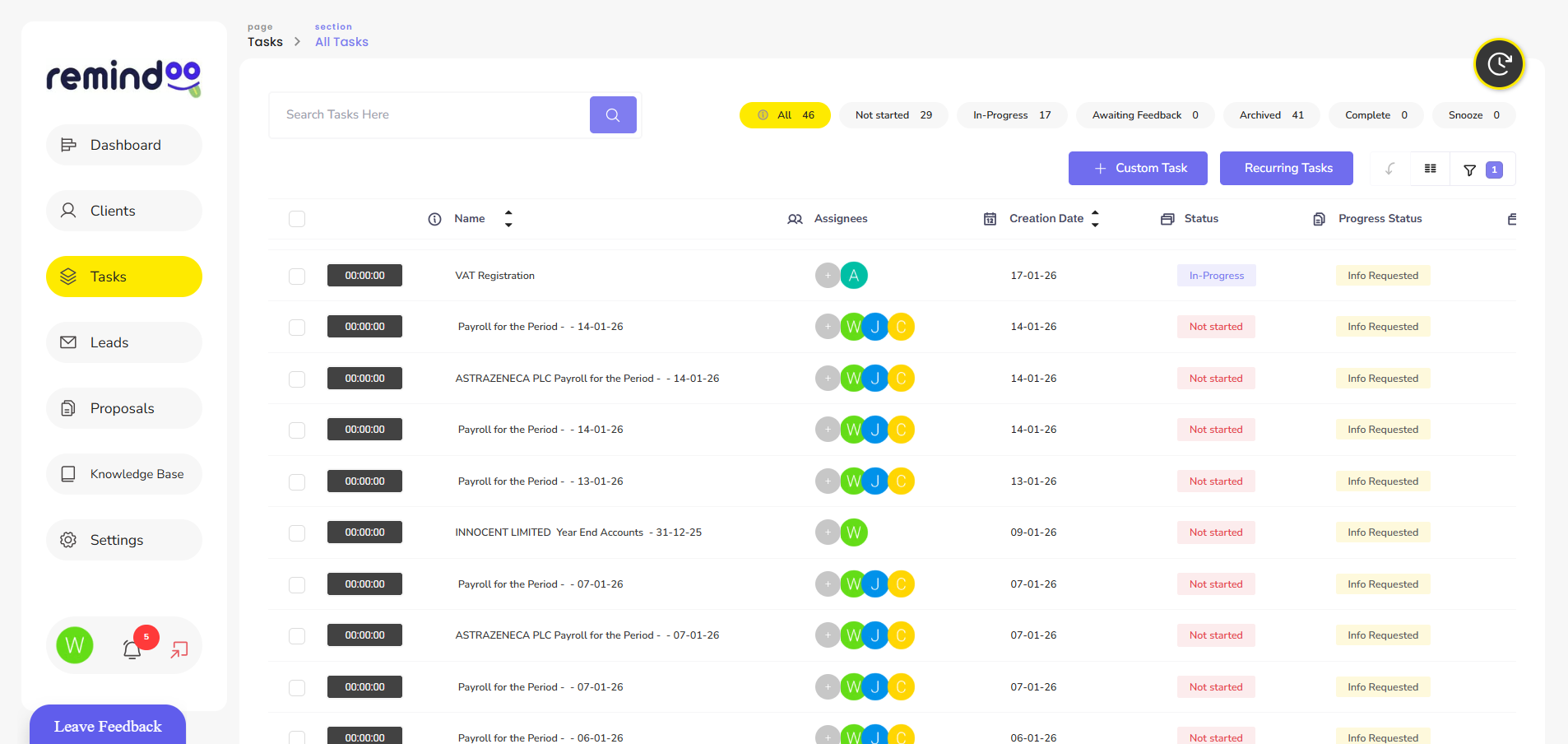
Running an accountancy practice involves more than preparing accounts and submitting tax returns. Accountants must manage client requests, monitor deadlines, coordinate employees, review financial documents and ensure that every assignment progresses on time. When several clients require attention simultaneously, keeping track of every responsibility can become difficult.
Spreadsheets, emails and handwritten notes may work for a small workload, but they become harder to manage as a practice grows. Tasks can be overlooked, responsibilities may become unclear and managers can struggle to understand which assignments need attention.
Task management software for accountants provides a structured way to organise these responsibilities. It helps accounting teams allocate work, monitor progress, establish priorities and maintain visibility across client assignments.
For modern accountancy practices, solutions such as Remindoo can bring different workflow activities together, helping teams manage their daily responsibilities without relying on disconnected systems.
This guide explains how task management software works, which features accounting practices should consider and how structured task management can improve operational efficiency.
Why Accountancy Practices Need Dedicated Task Management Systems
Accounting work follows recurring deadlines and involves multiple stages of preparation, review and submission. A single client engagement might require document collection, bookkeeping, reconciliation, tax calculations, internal checks and final approval.
Managing these activities manually creates several operational challenges.
1. Multiple Client Deadlines Require Consistent Monitoring
Accountants often work with clients who have different reporting periods, tax obligations and submission dates. Missing an important deadline can create additional work, client dissatisfaction or potential compliance consequences.
A centralised task management system allows practices to record upcoming responsibilities and monitor their progress. Managers can identify outstanding assignments before they become urgent.
2. Manual Task Allocation Creates Unclear Responsibilities
When managers distribute assignments through emails or informal conversations, employees may not always understand who owns each responsibility.
Dedicated software allows managers to assign tasks to specific team members, set deadlines and establish clear expectations. Employees can see their responsibilities without searching through multiple conversations.
3. Disconnected Communication Slows Down Workflows
An accountant might receive client documents through email, discuss an issue through another communication channel and update task progress in a spreadsheet.
This fragmented approach makes it difficult to maintain a consistent overview.
Connecting task management with client management, document handling and communication workflows helps accounting teams reduce unnecessary administrative work.
4. Managers Have Limited Visibility of Team Performance
Without a central tracking system, managers may need to contact employees individually to understand assignment progress.
Task management software provides a clearer overview of completed, ongoing, pending and overdue work. This allows practice managers to identify workload issues and make informed decisions about resource allocation.
How Task Management Software for Accountants Works
Task management software provides a digital environment where accounting practices can create, assign, organise and monitor work.
Instead of maintaining separate task lists for different employees and clients, practices can manage assignments through a central system.
A typical accounting workflow might follow these stages:
-
Task creation: A manager creates an assignment for a client, such as preparing a VAT return.
-
Task allocation: The assignment is allocated to an accountant or relevant team member.
-
Deadline setting: A due date and priority level are established.
-
Work execution: The assigned employee completes the required activities and updates progress.
-
Internal review: A manager or senior accountant checks the completed work where required.
-
Task completion: The assignment is marked as completed once the necessary work has been finalised.
This structure makes responsibilities easier to follow and reduces dependence on manual progress updates.
Essential Features to Look for in Accounting Task Management Software
Not every task management platform is designed for the operational requirements of an accountancy practice. Accounting teams should consider features that support client-related work, recurring responsibilities, employee collaboration and deadline monitoring.
1. Task Creation and Assignment
A good system should allow managers to create assignments and allocate them to the appropriate employees.
Useful capabilities include:
-
Assigning tasks to individual employees or teams.
-
Adding descriptions and supporting instructions.
-
Setting deadlines and priority levels.
-
Tracking task ownership.
-
Updating task statuses as work progresses.
Clear task ownership helps prevent duplicated work and confusion between team members.
2. Recurring Task Management
Many accounting responsibilities repeat monthly, quarterly or annually. Examples include bookkeeping, payroll processing, VAT returns and year-end accounts preparation.
Recurring task functionality allows practices to establish repeatable workflows instead of creating every assignment manually.
For example, a practice could establish a monthly bookkeeping workflow that automatically creates the relevant tasks for each client and assigns them to the responsible employees.
3. Deadline Tracking and Automated Reminders
Accountants need to monitor different deadlines throughout the financial year.
A task management platform should provide deadline visibility and reminders to help employees prepare for upcoming work.
Managers can use these features to identify overdue assignments, follow up on outstanding activities and prioritise urgent responsibilities.
However, software reminders should support rather than replace the practice's formal compliance calendar and deadline checks.
4. Team Collaboration and Communication
Accounting assignments often involve several employees. A junior accountant may prepare financial information, while a senior accountant reviews the work before submission.
Collaboration features help teams:
-
Share task-related updates.
-
Communicate about outstanding requirements.
-
Record progress.
-
Clarify responsibilities.
-
Coordinate internal reviews.
Keeping relevant discussions connected to assignments makes it easier to understand what has happened and what needs to happen next.
5. Client Management Integration
Tasks in an accountancy practice are usually connected to specific clients.
Integrating task management with client management allows employees to access relevant client information and understand the context of their assignments.
For example, when an accountant opens a client's profile, they should be able to understand which activities are outstanding, which have been completed and whether further information is required.
6. Workflow Automation
Automation helps accounting practices reduce repetitive administrative activities.
Depending on the platform, automated workflows can support:
-
Creating recurring assignments.
-
Triggering reminders.
-
Moving tasks between workflow stages.
-
Notifying relevant team members.
-
Monitoring outstanding client requirements.
With Remindoo, accounting practices can use workflow management and task-related features alongside client management to organise operational activities more consistently.
7. Reporting and Performance Monitoring
Managers need more than a list of completed assignments. They need to understand how work is progressing across the practice.
Reporting features can help monitor:
-
Completed and pending tasks.
-
Overdue assignments.
-
Employee workloads.
-
Workflow progress.
-
Outstanding client activities.
These insights help managers identify bottlenecks and distribute work more effectively.
Common Accounting Tasks That Can Be Managed Through Software
Task management software can support different service areas within an accounting practice. Establishing dedicated workflows for recurring activities helps employees follow consistent procedures.
|
Accounting activity |
Example tasks |
|---|---|
|
Bookkeeping |
Collect bank statements, record transactions and reconcile accounts |
|
VAT returns |
Gather records, review VAT transactions and prepare returns |
|
Payroll |
Collect employee information, process payroll and review submissions |
|
Self Assessment |
Request records, prepare calculations and review tax returns |
|
Corporation Tax |
Gather financial information, calculate liabilities and prepare returns |
|
Annual accounts |
Complete year-end adjustments, prepare accounts and arrange approval |
|
Client onboarding |
Collect identification, complete AML checks and establish client records |
|
Companies House |
Monitor filing requirements and prepare relevant documentation |
These workflows can be adjusted according to the services offered, client requirements and internal review procedures of each practice.
How Task Management Software Improves Accounting Team Productivity
Implementing the right system can improve how accounting teams organise and complete their daily work.
Reduces Time Spent on Manual Administration
Employees often spend time checking emails, updating spreadsheets and asking colleagues for progress information.
A centralised platform reduces the need for these activities by providing a shared view of assignments and their current status.
Improves Workload Distribution
Managers can review employee responsibilities and identify situations where one team member has too many outstanding assignments.
They can then redistribute work according to availability, experience and task complexity.
This helps create a more balanced working environment and reduces unnecessary pressure during busy accounting periods.
Establishes Consistent Working Procedures
Different employees may approach similar assignments in different ways.
Documented workflows provide a consistent process for completing routine activities. They also help new employees understand their responsibilities and follow established procedures.
Helps Managers Identify Workflow Delays
If a VAT return is waiting for client documents or an annual accounts assignment has not reached the review stage, managers can identify the delay and take action.
This is particularly useful when several employees contribute to the same client engagement.
Supports Better Client Service
Clients expect timely communication and progress updates.
When accounting teams have a clear understanding of outstanding activities, they can respond to enquiries more accurately and follow up on missing information without unnecessary delays.
Task Management Software vs Spreadsheets: Which Is Better for Accountants?
Spreadsheets are a familiar way to organise tasks. They can be useful for sole practitioners or small teams with relatively straightforward workloads.
However, they have limitations when practices manage multiple employees, clients and recurring assignments.
|
Comparison |
Spreadsheets |
Dedicated task management software |
|---|---|---|
|
Task allocation |
Usually manual |
Structured assignment |
|
Deadline monitoring |
Requires manual updates |
Centralised tracking and reminders |
|
Recurring workflows |
Often require duplication |
Can support recurring processes |
|
Team collaboration |
Limited coordination |
Shared task visibility |
|
Progress monitoring |
Manual reporting |
Status and workflow tracking |
|
Workload visibility |
Requires spreadsheet reviews |
Centralised team overview |
|
Automation |
Limited or separately configured |
Workflow automation capabilities |
The right choice depends on the size and complexity of the practice.
A spreadsheet may remain suitable for a small operation. However, practices experiencing increasing workloads, communication difficulties or frequent deadline pressure may benefit from dedicated software.
How to Choose the Right Task Management Software for an Accountancy Practice
Choosing software requires an understanding of the practice's existing operations and future requirements.
Before selecting a platform, consider the following factors.
Understand Your Current Workflow Problems
Identify the activities that create the most administrative pressure.
For example, your practice may struggle with overdue assignments, missing client documents, unclear task ownership or inconsistent employee updates.
The software should address these specific problems rather than introduce unnecessary complexity.
Evaluate Ease of Use
A platform should be straightforward for accountants, administrators and managers to use.
Complicated systems can create additional work and reduce employee adoption.
Look for an interface that allows employees to understand their responsibilities and update task progress without extensive training.
Check Integration Capabilities
Consider whether the platform works with the systems your practice already uses.
Client management, document handling, email communication and accounting software integrations can influence how smoothly information moves between different activities.
Always verify the integrations available before making a purchasing decision.
Review Security and Access Controls
Accounting practices handle confidential financial and personal information.
Check whether the provider offers appropriate access permissions, secure authentication, data protection measures and suitable arrangements for storing and processing client information.
A task management platform should form part of a wider information security and data protection strategy.
Consider Reporting and Scalability
A platform should support the practice as its client base and team grow.
Evaluate whether managers can monitor employee workloads, identify overdue assignments and review workflow performance.
Also consider whether the pricing and available functionality remain suitable as the practice expands.
How Remindoo Helps Accountants Manage Tasks and Workflows
Remindoo is an AI-powered practice management software for UK accountants and bookkeepers. It brings together tools that support client management, workflow organisation and day-to-day practice operations.
Rather than managing every responsibility through separate spreadsheets and email conversations, accounting teams can use a more connected approach to organising their work.
Some relevant capabilities include:
Client Management
Client management functionality helps practices organise client information and maintain visibility of ongoing activities. Employees can work with client-related information without relying entirely on separate records.
Workflow Management
Remindoo provides workflow management capabilities that help accounting practices organise operational processes and establish more consistent ways of completing assignments.
Automated Reminders
Reminders help teams keep track of upcoming responsibilities and follow up on activities that require attention.
Analytics and Reporting
Practice analytics provide additional visibility into operational activities, helping managers understand workflow progress and identify areas that may require attention.
Client Portal
A client portal provides a dedicated environment for client interactions and information exchange, supporting more organised communication between accounting teams and their clients.
AI-Powered Features
AI-powered functionality, including email triage and summaries, can help accountants manage information and reduce some repetitive administrative activities.
For practices looking to improve their operational processes, Remindoo offers an integrated approach to managing clients, workflows and practice activities.
You can explore Remindoo's practice management software to understand how its features can support your accounting practice.
The Importance of Good Record Keeping Alongside Task Management
Task management and financial record keeping are related but separate responsibilities.
Task management software helps accountants organise activities, assign responsibilities and monitor progress. It does not automatically replace accounting software or statutory record-keeping systems.
According to HMRC guidance on keeping business records, businesses must maintain accurate, complete and readable records to support their tax obligations.
Accounting practices should therefore ensure that their task management processes work alongside appropriate accounting and document management systems.
This distinction is important because marking an assignment as complete does not necessarily mean that all supporting financial records have been correctly stored or retained.
Conclusion
Managing an accountancy practice requires careful coordination of client responsibilities, employee workloads and recurring deadlines. Relying entirely on spreadsheets, emails and manual reminders can make these activities increasingly difficult as the practice grows.
Task management software for accountants provides a more structured approach to organising assignments, monitoring progress and maintaining clear responsibilities.
When evaluating a platform, accounting practices should prioritise ease of use, recurring workflows, deadline tracking, team collaboration, reporting and client management capabilities.
With an organised system in place, accountants can spend less time coordinating administrative activities and more time delivering reliable services to their clients. Remindoo provides a range of practice management features that can help UK accounting firms work towards more organised and efficient operations.

 English
 Arabic
 French
 Portuguese
 Deutsch
 Turkish
 Dutch
 Italiano
 Russian
 Romaian
 Portuguese (Brazil)
 Greek