

Accountancy Practice Management Software: A Complete Guide for Modern Accounting Firms
Running an accounting practice involves much more than preparing accounts and submitting tax returns. Accountants must manage client communications, organise documents, monitor deadlines, allocate work and keep track of ongoing assignments. When these responsibilities are handled through separate spreadsheets, emails and manual processes, everyday administration can become difficult to manage.
Accountancy practice management software helps firms bring these activities together in one organised system. It gives accountants better visibility of client work, supports consistent workflows and reduces the administrative effort involved in managing a growing practice.
As accounting firms take on more clients and deal with increasingly demanding compliance requirements, having structured practice management processes becomes important. The right software can help firms organise their operations without making everyday tasks unnecessarily complicated.
This guide explains what accountancy practice management software does, which features matter, how it supports accounting teams and what firms should consider before choosing a solution.
What Is Accountancy Practice Management Software?
Accountancy practice management software is a digital platform that helps accounting firms manage their internal operations and client-related activities.
Instead of relying on disconnected tools, accountants can use one system to organise client information, assign responsibilities, monitor deadlines and track work progress.
Depending on the platform, accountancy practice management software may include:
-
Client management: Store and organise client details, contact information and service records.
-
Workflow management: Create tasks, assign responsibilities and monitor progress.
-
Deadline tracking: Monitor important accounting, tax and compliance dates.
-
Document management: Organise client documents and supporting records.
-
Client communication: Manage messages, requests and communication history.
-
Time and task tracking: Understand how employees spend their working hours.
-
Practice reporting: Review workloads, outstanding tasks and operational performance.
The main purpose is to create a more organised working environment where accountants can see what needs attention and who is responsible for completing it.
Why Do Accounting Firms Need Practice Management Software?
Many accounting practices start with basic spreadsheets, email accounts and shared folders. These tools may work when a firm has only a small number of clients.
However, as the practice grows, manual administration can become increasingly difficult.
For example, an accountant might receive a document through email, record a deadline in a spreadsheet, assign work through a messaging application and update the client using another platform. Important information becomes scattered across different systems.
Practice management software helps address these operational challenges.
1. Manage Growing Client Portfolios
As a firm takes on more clients, maintaining accurate and accessible client information becomes essential.
A centralised client management system allows accountants to organise contact details, service information, outstanding requests and relevant records.
Employees can access the information they need without searching through multiple email conversations or spreadsheets.
This also helps when responsibilities move between team members because client information is easier to locate.
2. Reduce Administrative Work
Manual administration can take up a significant amount of an accountant's working day.
Examples include:
-
Sending repeated document requests.
-
Updating task spreadsheets.
-
Following up on outstanding information.
-
Checking individual assignment progress.
-
Reminding employees about approaching deadlines.
Workflow automation and centralised task management can reduce repetitive administrative activities.
For instance, a firm can establish a standard onboarding workflow that creates tasks whenever a new client joins. The responsible employee can then follow the same process for each new engagement.
3. Improve Team Collaboration
Accounting work often involves several employees. One person may collect client information, another may prepare accounts and a manager may review the completed work.
Without a structured system, employees may struggle to understand which tasks are complete and which require attention.
Practice management software provides visibility into:
-
Task ownership.
-
Work progress.
-
Pending approvals.
-
Internal responsibilities.
-
Outstanding client information.
This makes it easier for managers to distribute workloads and identify delays before they affect delivery.
4. Keep Track of Important Deadlines
Accounting firms work with recurring deadlines for tax returns, VAT submissions, payroll and annual accounts.
Missing a deadline can create additional work and potentially expose clients to penalties.
A practice management platform can help teams record important dates, assign responsibilities and receive reminders before work becomes overdue.
However, software reminders should support rather than replace accountants' responsibility to verify statutory deadlines and submission requirements.
Essential Features to Look for in Accountancy Practice Management Software
Not every accounting practice needs the same functionality. A small bookkeeping firm may prioritise client communication and task organisation, while a larger accountancy firm may require advanced reporting, workflow automation and team management.
The following features are worth evaluating before selecting a platform.
1. Centralised Client Management
Client management is one of the most important parts of an effective practice management system.
A centralised platform should allow firms to maintain organised client profiles containing relevant contact details, services, communication records and outstanding requirements.
This helps employees understand each client's position without repeatedly requesting information from colleagues.
2. Workflow and Task Management
A good workflow management system helps firms turn recurring accounting processes into structured tasks.
For example, a VAT return workflow could include:
-
Request VAT records from the client.
-
Collect invoices and supporting documents.
-
Review the submitted information.
-
Prepare the VAT return.
-
Complete internal checks.
-
Submit the return.
-
Update the client and record completion.
Each stage can have an assigned employee and a deadline.
This creates a clear process that employees can follow consistently.
3. Automated Reminders and Notifications
Manual follow-ups can become difficult when employees manage dozens or hundreds of client relationships.
Automated reminders help firms follow up on outstanding documents, upcoming deadlines and incomplete assignments.
For example, a system might notify an employee when a client has not provided the records required to prepare their accounts.
Automation should be configurable so that clients and employees receive relevant notifications rather than unnecessary messages.
4. Client Portal and Document Sharing
A client portal provides a central location where clients can exchange information and documents with their accounting firm.
Depending on the software, clients may be able to:
-
Upload financial documents.
-
Respond to information requests.
-
Review outstanding requirements.
-
Access shared files.
-
Communicate with their accountant.
A secure portal can make information exchange more organised than relying entirely on email attachments.
Firms should also assess access controls, encryption, data retention and other security measures before storing sensitive financial information.
5. Practice Performance Reporting
Managers need to understand how effectively their teams are operating.
Reporting features can help identify:
-
Outstanding assignments.
-
Overdue tasks.
-
Employee workloads.
-
Client work in progress.
-
Workflow bottlenecks.
-
Task completion patterns.
These insights support better resource allocation and help managers identify processes that need improvement.
6. Integration with Accounting and Tax Software
Accountants often use specialist software for bookkeeping, payroll, tax returns and document processing.
Practice management software should work effectively alongside the tools a firm already uses.
Before purchasing a platform, check whether it supports the required integrations and whether information can be transferred reliably.
Integration capabilities can reduce duplicate data entry and help create a more connected working environment.
How Does Practice Management Software Support Making Tax Digital?
Making Tax Digital (MTD) has increased the importance of digital record-keeping and connected accounting processes for UK accounting firms.
Accountants need to manage client information, coordinate submissions and ensure that the appropriate software is used for digital reporting.
HMRC explains that businesses affected by Making Tax Digital for Income Tax must use compatible software to create and store digital records and send quarterly updates.
Accountancy practice management software can support the operational side of this process by helping firms:
-
Organise clients who need MTD support.
-
Assign responsibility for quarterly updates.
-
Track outstanding client records.
-
Monitor internal preparation and review tasks.
-
Coordinate communication between accountants and clients.
-
Maintain visibility of upcoming work.
It is important to distinguish practice management software from MTD-compatible accounting software. A practice management platform does not automatically meet HMRC's digital record-keeping or submission requirements.
Firms should check software compatibility before relying on a particular product for statutory submissions.
Official HMRC resource: Find software that works with Making Tax Digital for Income Tax.
How to Choose the Right Practice Management Software for Your Accounting Firm
Selecting software requires more than comparing feature lists. Firms should consider their existing processes, team structure, client requirements and future growth plans.
Here are some practical considerations.
1. Understand Your Current Practice Workflows
Start by identifying how your team currently manages client onboarding, document collection, accounts preparation, tax returns and internal reviews.
Look for processes that involve repeated manual work or create unnecessary delays.
This helps establish which software features will provide genuine operational value.
2. Consider the Size of Your Accounting Practice
A small accounting practice may only need client management, task assignment and deadline reminders.
A larger firm may require:
-
Multiple user roles and permissions.
-
Advanced workflow automation.
-
Department-level task management.
-
Detailed reporting.
-
Integration with existing accounting applications.
-
Centralised client communication.
Choose a platform that meets current requirements without creating unnecessary complexity.
3. Evaluate Data Security and Access Controls
Accounting firms handle confidential financial and personal information.
Before choosing a platform, assess its security arrangements.
Important considerations include:
-
User authentication.
-
Role-based access permissions.
-
Secure document storage.
-
Data encryption.
-
Backup and recovery procedures.
-
Data protection policies.
-
Data export and retention options.
UK firms should also consider their obligations under the UK GDPR and the Data Protection Act 2018.
4. Check Integration Capabilities
A practice management platform should fit into the firm's existing technology environment.
Check whether it integrates with the accounting, bookkeeping, payroll and tax applications your team already uses.
Also consider whether integrations support reliable data transfer and reduce duplicate administration.
5. Review Pricing and Scalability
Software pricing structures vary. Some providers charge per user, while others use active-client subscriptions or feature-based plans.
Compare the total cost rather than looking at the advertised monthly price alone.
Consider:
-
Number of users included.
-
Active-client limits.
-
Additional feature charges.
-
Storage allowances.
-
Implementation costs.
-
Training and support.
-
Future pricing as the practice expands.
A suitable platform should remain practical as the firm's client portfolio and team grow.
How Remindoo Supports Accounting Practice Management
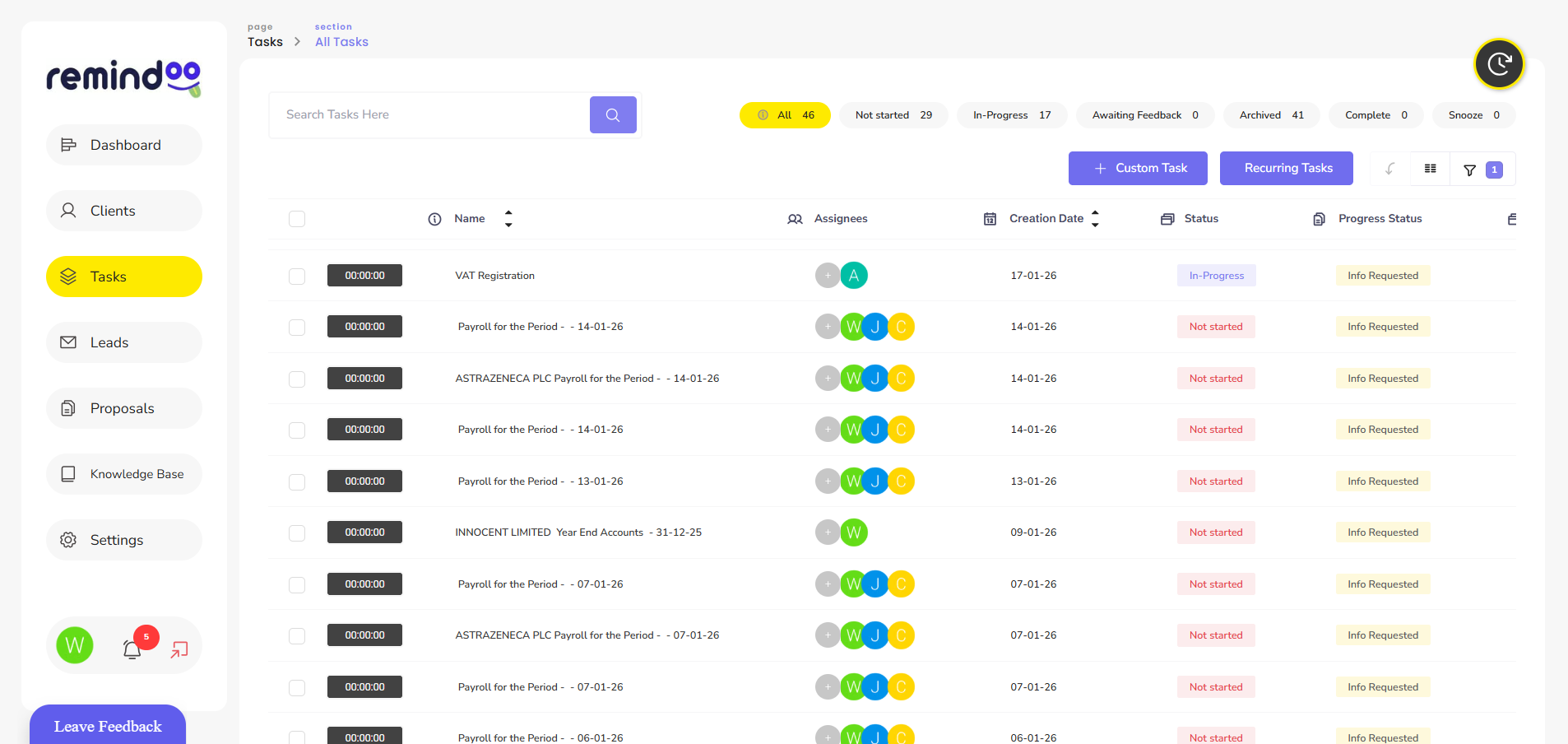
Remindoo is an AI-powered practice management platform designed for UK accountants and bookkeepers.
It brings together several operational functions that help accounting professionals organise client relationships, coordinate team activities and manage recurring work.
Rather than treating client communication, task management and workflow organisation as separate activities, Remindoo provides tools to support a more connected practice management process.
Some of its key capabilities include:
Client Management
Remindoo helps accounting practices organise client information and manage ongoing client-related activities.
Centralised client management makes it easier for employees to access relevant information and understand outstanding requirements.
Workflow Management
Accounting firms can organise recurring processes and assign work to employees.
Structured workflows help teams follow consistent procedures for activities such as document collection, accounts preparation and compliance work.
Email Triage
Managing a busy client inbox can be challenging for accounting professionals.
Remindoo includes email triage capabilities that help accountants organise incoming communications and identify messages requiring attention.
This can support better organisation when dealing with multiple client requests.
Client Portal
Client portals provide a more structured way to exchange information and documents.
Instead of relying entirely on email attachments, firms can use a dedicated environment to manage client interactions and information requests.
Proposals and AML
Client onboarding involves several administrative and compliance-related activities.
Remindoo includes proposals and AML-related functionality to support these processes and help firms organise onboarding activities.
Analytics and Reporting
Understanding practice performance helps managers make better operational decisions.
Remindoo's analytics capabilities support visibility into practice activities and help firms review how work is progressing.
Companies House Integration
Companies House-related information is important when managing company clients.
Remindoo includes Companies House synchronisation functionality to support access to relevant company information within practice management workflows.
AI-Powered Features
AI can support accounting teams by reducing repetitive administrative activities and helping employees work with information more efficiently.
Remindoo includes AI-powered summaries and workflow-related capabilities designed to support everyday practice operations.
For firms looking to organise their accounting operations, explore Remindoo to learn more about its practice management features.
Common Mistakes to Avoid When Implementing Practice Management Software
Introducing new software does not automatically improve an accounting firm's operations. The implementation process also matters.
Some common mistakes include:
Choosing Software Based Only on Price
The cheapest platform may not provide the workflows, integrations or security features a practice needs.
Evaluate functionality and long-term suitability alongside subscription costs.
Moving Existing Processes Without Reviewing Them
Transferring inefficient manual processes into a new platform may simply recreate existing problems.
Review workflows before implementation and identify opportunities to simplify them.
Ignoring Employee Training
Employees need to understand how to use the platform correctly.
Provide practical training and establish internal procedures for assigning tasks, updating progress and managing client information.
Automating Every Process
Automation is useful for repetitive activities, but not every accounting task should operate without human oversight.
Financial reviews, tax decisions and important client communications may still require professional judgement.
Use automation where it improves consistency without removing necessary checks.
Failing to Monitor Software Performance
After implementation, review whether the platform is actually improving daily operations.
Monitor task completion, overdue assignments, employee feedback and administrative workload.
These indicators can help identify areas where workflows need further adjustment.
The Future of Accountancy Practice Management Software
Technology is changing how accounting practices organise their operations.
Several developments are influencing the future of practice management platforms.
Artificial intelligence: AI-powered tools can assist with email summaries, information organisation and repetitive administrative activities.
Workflow automation: More accounting firms are using automated workflows to coordinate recurring activities and reduce manual follow-ups.
Connected systems: Integrations between accounting, payroll, document management and practice management applications are becoming increasingly important.
Digital client experiences: Clients increasingly expect convenient ways to share documents, communicate with accountants and monitor outstanding requirements.
Data-driven practice management: Reporting and analytics can help managers understand workloads, identify bottlenecks and make better operational decisions.
These developments are likely to make practice management platforms increasingly important to firms seeking consistent and scalable operating processes.
Final Thoughts
Managing an accounting practice requires effective coordination between employees, clients, documents and deadlines. As client portfolios grow, relying entirely on spreadsheets, emails and manual reminders can make everyday administration harder to control.
Accountancy practice management software provides a structured way to manage these responsibilities. Features such as client management, workflow automation, deadline tracking, document sharing and reporting can help accounting firms improve operational organisation.
However, choosing the right platform requires understanding the firm's actual requirements. Security, integrations, scalability and employee adoption should all influence the decision.
Platforms such as Remindoo bring several of these capabilities together, helping UK accountants and bookkeepers organise their practice operations and manage client-related work more efficiently.
The objective is not simply to introduce another software tool. It is to build a more organised accounting practice where employees can focus on delivering accurate, reliable services to their clients.
 Portuguese (Brazil)
 English
 Arabic
 French
 Spanish
 Portuguese
 Deutsch
 Turkish
 Dutch
 Italiano
 Russian
 Romaian
 Greek