

Accounting Practice Management Software: How to Build a More Efficient and Organised Accounting Firm
Running an accounting firm involves more than preparing accounts and submitting tax returns. Accountants and practice managers must coordinate client communication, organise financial documents, monitor deadlines, allocate workloads and ensure that every task is completed accurately.
Managing these responsibilities through spreadsheets, emails and separate applications can create unnecessary administrative work. Important client requests may get overlooked, deadlines can become difficult to track and employees may struggle to understand their priorities.
This is where accounting practice management software becomes valuable. It brings essential practice operations into a more organised digital environment, helping accounting firms manage clients, coordinate teams and monitor ongoing work.
Rather than relying on disconnected tools, practices can use a centralised system to improve visibility, establish consistent processes and deliver a more organised client experience.
What Is Accounting Practice Management Software?
Accounting practice management software is a digital solution that helps accounting firms organise and manage their internal operations and client-related activities.
It provides tools for managing client information, assigning work, monitoring deadlines, coordinating employees and tracking the progress of accounting services.
Depending on the platform, its features may include:
-
Client relationship and contact management.
-
Workflow and task automation.
-
Document management and storage.
-
Deadline and compliance tracking.
-
Client communication and email management.
-
Employee workload allocation.
-
Practice performance reporting.
-
Proposals and client onboarding.
The purpose is to reduce administrative complexity and give accountants better control over their daily responsibilities.
It is important to distinguish practice management software from accounting software. Accounting software primarily handles financial records, bookkeeping, invoicing and financial reporting. Practice management software focuses on how an accounting firm organises its clients, employees and service delivery.
Some platforms integrate both types of functionality, while others specialise in managing practice operations.
Why Do Accounting Firms Need Practice Management Software?
As an accounting practice grows, managing work becomes increasingly complicated. A firm serving 20 clients may manage relatively straightforward processes, but a practice serving hundreds of businesses must coordinate different deadlines, service requirements and communication channels.
Without an organised system, administrative responsibilities can consume time that accountants could otherwise spend on client services.
Here are some common operational challenges that make practice management software important.
1. Disorganised Client Information
Accounting firms maintain considerable information about their clients, including contact details, business records, service agreements, tax information and previous communications.
When information is stored across multiple spreadsheets, email accounts and folders, finding the correct details can take longer.
A centralised client management system allows authorised employees to access relevant client information from one place. This makes it easier to understand client requirements, review previous interactions and manage ongoing responsibilities.
2. Difficulty Tracking Deadlines
Accounting practices work with recurring deadlines throughout the financial year.
These may include:
-
VAT return submissions.
-
PAYE and payroll responsibilities.
-
Self Assessment tax returns.
-
Corporation Tax deadlines.
-
Confirmation statements.
-
Annual accounts submissions.
-
Making Tax Digital reporting requirements.
Missing a deadline can create additional work and potentially expose clients to penalties.
Practice management software can help firms organise deadlines, assign responsibility and schedule reminders. Employees can identify upcoming work before it becomes urgent.
3. Manual Administrative Work
Accountants frequently perform repetitive activities, such as sending reminders, updating task statuses, requesting documents and following up with clients.
When these processes are handled manually, they can take time away from more valuable accounting work.
Workflow automation helps standardise recurring activities. For example, a practice can establish a process for requesting documents, assigning a review task and notifying the responsible employee when information becomes available.
4. Limited Visibility of Team Performance
Practice managers need to understand how work is progressing across different employees and departments.
Without centralised reporting, it can be difficult to identify overloaded employees, delayed tasks or inefficient workflows.
A practice management system provides greater visibility into task progress and workload distribution, helping managers make more informed operational decisions.
Essential Features to Look for in Accounting Practice Management Software
Not every accounting firm requires the same software. A small bookkeeping practice may prioritise client communication, while a larger accountancy firm may need advanced workflow automation and reporting.
However, several features are particularly useful when evaluating a platform.
1. Client Management and Centralised Records
Client management is one of the most important functions of practice management software.
The system should allow firms to maintain organised client profiles containing relevant contact information, service details, communication history and associated tasks.
A centralised client database reduces the need to search through separate systems.
It also helps employees understand the relationship between individual clients and the services being delivered.
2. Workflow and Task Management
Workflow management helps accounting firms establish repeatable processes for recurring services.
For example, a VAT return workflow might include:
-
Create a task for the upcoming VAT period.
-
Assign the task to the responsible accountant.
-
Request relevant financial documents from the client.
-
Review the submitted information.
-
Complete the VAT return.
-
Arrange the required approval and submission.
-
Update the task status.
Each stage has a clear responsibility, making it easier to monitor progress.
A good task management system should support priorities, deadlines, task assignments and progress tracking.
3. Automated Client Communication
Regular communication is essential for maintaining strong relationships with accounting clients.
However, sending individual reminders and following up on outstanding information can become time-consuming.
Software with email management and communication features can help practices organise client conversations, track requests and reduce repetitive administrative work.
Some platforms also offer automated notifications and email triage to help employees prioritise incoming messages.
Automation should support communication rather than replace professional judgement. Important financial queries and sensitive client matters still require appropriate human attention.
4. Document Management
Accounting firms regularly receive invoices, bank statements, payroll information, receipts and other financial documents.
A document management system helps organise these records and makes it easier for authorised employees to locate relevant information.
When evaluating this feature, consider:
-
Secure document storage.
-
Access permissions.
-
Document categorisation.
-
Version management.
-
Client document submission.
-
Integration with existing accounting tools.
Document management should also support appropriate retention and security policies.
5. Deadline and Compliance Tracking
Accounting practices need to monitor multiple deadlines for different clients.
A useful platform should provide deadline visibility, reminders and task assignment options.
For example, practice managers should be able to identify which VAT returns are approaching their submission dates and which clients have outstanding information.
This helps firms plan workloads and follow up before deadlines become urgent.
However, software reminders do not guarantee compliance. Accountants should maintain appropriate review procedures and verify statutory deadlines against the relevant official guidance.
6. Team Collaboration and Workload Management
As firms expand, employees may work on different clients and service categories simultaneously.
Team collaboration features help managers allocate responsibilities and monitor progress.
Useful capabilities include:
-
Individual task assignments.
-
Shared task visibility.
-
Internal notes.
-
Workload monitoring.
-
Progress updates.
-
Employee performance reporting.
These features make it easier to coordinate work without relying entirely on internal emails or informal conversations.
7. Reporting and Practice Analytics
Practice managers need reliable information to evaluate operational performance.
Reporting features can help monitor:
-
Outstanding client tasks.
-
Completed and overdue work.
-
Employee workloads.
-
Client onboarding progress.
-
Workflow performance.
-
Service delivery activity.
These insights can help managers identify bottlenecks and improve how work is distributed.
The usefulness of reporting depends on accurate and consistent data entry. A reporting dashboard cannot provide reliable insights if employees do not regularly update task statuses.
How Accounting Practice Management Software Improves Daily Operations
The benefits of practice management software become clearer when considering how it changes everyday accounting activities.
| Daily activity | Without practice management software | With an organised system |
|---|---|---|
| Client management | Information spread across multiple files | Centralised client records |
| Task allocation | Manual assignments and follow-ups | Structured task allocation |
| Deadline monitoring | Separate calendars and spreadsheets | Centralised deadline tracking |
| Email management | Employees search through individual inboxes | Organised communication workflows |
| Document collection | Repeated manual requests | Structured document requests |
| Team coordination | Frequent status updates | Shared task visibility |
| Performance monitoring | Manual reporting | Centralised operational insights |
Reduced Administrative Work
Automating repetitive processes allows employees to spend less time on routine coordination.
For example, recurring tasks can follow predefined workflows instead of requiring managers to create every task manually.
Better Workload Distribution
Managers can review employee assignments and identify situations where certain team members have too many outstanding responsibilities.
This makes workload planning more structured.
Improved Client Experience
Clients benefit when their accountants communicate clearly, request documents in an organised manner and provide updates about ongoing work.
A consistent process can reduce confusion and make service delivery more predictable.
Greater Operational Visibility
Practice managers can review work across the firm without requesting individual updates from every employee.
This makes it easier to identify delayed tasks and take corrective action.
How to Choose the Right Accounting Practice Management Software
Selecting software requires an understanding of the firm's existing processes and future requirements.
Instead of choosing a platform based only on the number of features, evaluate how well it addresses actual operational problems.
Consider the following factors.
Assess Your Practice's Requirements
Start by identifying the activities that create the most administrative difficulty.
For example, a practice may struggle with client document collection, while another may have difficulty monitoring employee workloads.
Prioritise software that addresses these specific problems.
Check Integration Capabilities
Accounting firms often use separate tools for bookkeeping, payroll, tax preparation, document storage and communication.
The selected platform should work effectively with the existing technology environment.
Check whether it offers direct integrations, supported data transfers or suitable connections with other applications.
Evaluate Data Security
Accounting firms handle confidential financial and personal information.
Security should therefore be a major consideration when choosing software.
Review the provider's security documentation, access controls, authentication options, encryption practices, backup arrangements and data protection policies.
Also consider whether the provider offers appropriate contractual terms and supports the firm's obligations under UK data protection law.
Consider Scalability
Software should support the firm's operational requirements as its client base and employee numbers increase.
Consider whether the platform can accommodate additional users, clients, workflows and service categories without requiring a complete change of system.
Review Ease of Use
A platform may offer extensive functionality but still be difficult for employees to use.
A complicated interface can reduce adoption and create additional training requirements.
Look for an intuitive system that allows employees to understand their responsibilities and complete everyday tasks efficiently.
Compare Support and Pricing
Evaluate subscription costs, available support, onboarding assistance and training resources.
Consider the total cost of ownership rather than focusing exclusively on the advertised monthly price.
A suitable platform should provide practical value without introducing unnecessary complexity.
Making Tax Digital and the Importance of Digital Practice Workflows
Digital processes are becoming increasingly important for UK accounting practices.
Making Tax Digital requires relevant businesses to maintain specified digital records and use compatible software for applicable tax obligations.
Accountants and agents also need to coordinate responsibilities, client authorisations and digital record management.
According to HMRC guidance, VAT-registered businesses must use compatible software to maintain the required digital VAT records and submit VAT Returns, unless an exemption applies.
For accounting practices, this makes organised digital workflows particularly valuable. Teams need to know which clients require action, what information is outstanding and which employee is responsible for the next stage.
It is important to understand that practice management software is not automatically Making Tax Digital-compatible. Firms should separately verify the tax functionality and compatibility of their accounting or submission software.
Read the official GOV.UK guidance on finding software compatible with Making Tax Digital for VAT.
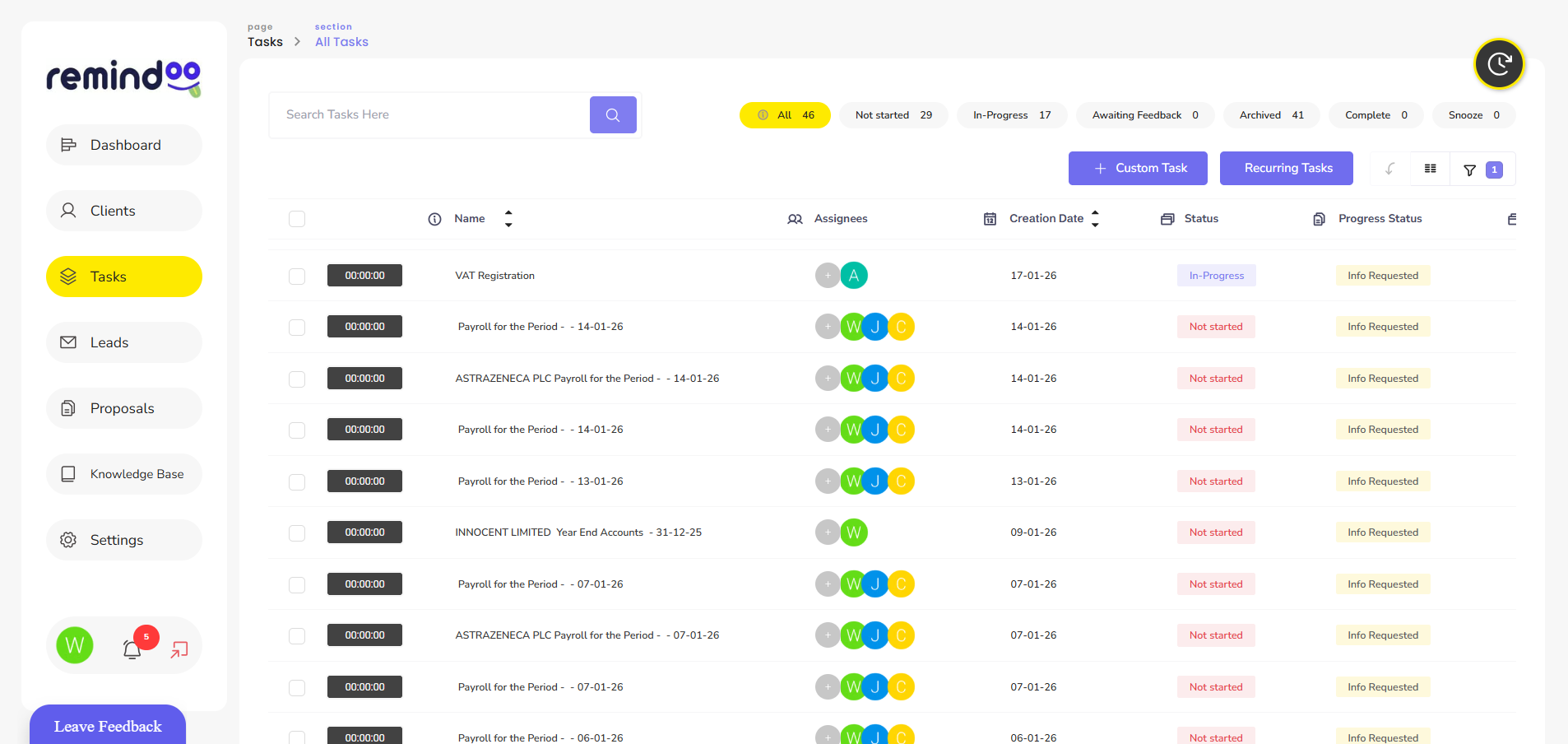
How Remindoo Supports Accounting Practice Management
Choosing the right platform can help accounting firms bring different operational activities into a more organised working environment.
Remindoo is an AI-powered practice management platform developed for UK accountants and bookkeepers.
It provides tools designed to help accounting practices manage clients, coordinate employees and organise everyday operations.
Its features address several important areas of practice management.
Client Management
Remindoo helps accounting practices organise client-related information and manage their ongoing relationships.
Having structured client information makes it easier for teams to understand responsibilities and coordinate service delivery.
Workflow Management
Accounting practices can use workflow functionality to organise recurring activities and track the progress of assigned work.
Structured workflows help employees understand what needs to be completed and which tasks require attention.
Email Triage and AI Summaries
Managing a high volume of client emails can create administrative pressure.
Remindoo includes email triage and AI-powered summarisation features designed to help accountants organise incoming communications and understand important information more efficiently.
These tools can support faster review, while accountants retain responsibility for checking important details and responding appropriately.
Client Portal
A client portal provides a more organised way for accounting practices and their clients to exchange information.
It can support client communication and document-related activities, reducing dependence on scattered email conversations.
Proposals and AML
Client onboarding involves several administrative and compliance-related activities.
Remindoo includes proposals and AML functionality to help practices organise parts of the onboarding process.
Firms should still follow their own AML procedures and verify that all required checks have been completed.
Analytics and Reporting
Practice managers need visibility into ongoing work and operational performance.
Remindoo provides analytics functionality to help practices review relevant information and monitor their operations.
By bringing these capabilities together, Remindoo provides accounting firms with a platform for organising important practice management activities.
Explore Remindoo practice management software for UK accountants to learn more about its features.
Common Mistakes to Avoid When Implementing Practice Management Software
Purchasing software is only one part of improving practice operations. Firms also need to introduce it properly.
Several common mistakes can reduce the value of a new system.
1. Moving Disorganised Data into a New System
Transferring incomplete or outdated client information can create problems from the beginning.
Before implementation, review existing records, remove unnecessary duplicates and establish consistent data structures.
2. Automating Inefficient Processes
Automation does not automatically improve every workflow.
If an existing process contains unnecessary steps, automating it may simply make an inefficient process run faster.
Review and simplify workflows before introducing automation.
3. Providing Insufficient Employee Training
Employees need to understand how to use the platform and why the firm is introducing it.
Provide practical training based on everyday responsibilities rather than relying exclusively on written instructions.
4. Ignoring Software Integrations
Using several disconnected applications can recreate the same administrative problems that practice management software is intended to solve.
Review integration options before implementation and establish clear procedures for transferring information between systems.
5. Failing to Monitor Performance
After implementation, review whether the software is improving daily operations.
Monitor task completion, overdue work, employee adoption and recurring administrative problems.
Make adjustments when workflows are not producing the expected results.
Frequently Asked Questions
What is the best accounting practice management software?
The best accounting practice management software depends on a firm's size, client base, workflows and operational requirements. Compare client management, workflow automation, integrations, reporting, security and ease of use before selecting a platform.
Is accounting practice management software different from accounting software?
Yes. Accounting software primarily manages financial activities such as bookkeeping, invoicing and financial reporting. Practice management software focuses on managing clients, employees, workflows, deadlines and service delivery within an accounting firm.
Can practice management software automate accounting tasks?
Yes. Depending on its features, practice management software can automate recurring task creation, notifications, client reminders, workflow updates and parts of communication management. Financial calculations and tax submissions may require separate accounting or tax software.
Does practice management software help with client management?
Yes. It can centralise client information, organise communication, track outstanding requests and associate tasks with individual clients. This helps employees manage client relationships more consistently.
Is practice management software suitable for small accounting firms?
Yes. Small accounting practices can benefit from structured task management, organised client records and automated reminders. The important consideration is choosing a platform that matches the firm's current requirements without unnecessary complexity.
What should accountants consider before choosing practice management software?
Accountants should evaluate client management, workflow automation, deadline tracking, integrations, data security, reporting, scalability, pricing and employee training requirements.
Can practice management software replace accounting software?
Not necessarily. Practice management software and accounting software perform different functions. Many firms use both systems together, allowing one to manage practice operations while the other handles financial records and tax-related activities.
Conclusion
Managing an accounting practice requires coordination between clients, employees, documents, deadlines and recurring responsibilities. When these activities rely on disconnected tools and manual processes, administrative work can become difficult to control.
Accounting practice management software provides a structured way to manage these responsibilities. Features such as client management, workflow automation, email organisation, deadline tracking and reporting help accounting firms improve operational visibility and establish more consistent processes.
However, successful implementation depends on selecting suitable software, organising existing workflows and ensuring employees use the system consistently.
Platforms such as Remindoo provide UK accounting practices with tools to organise client management, workflows, communication and other everyday operational activities.
The right system should not simply add another application to the firm's technology stack. It should make everyday practice management more organised, transparent and manageable.

 English
 French
 Spanish
 Portuguese
 Deutsch
 Turkish
 Dutch
 Italiano
 Russian
 Romaian
 Portuguese (Brazil)
 Greek