
Cloud-Based Accounting Practice Management Software: A Guide for Modern Accounting Firms
Managing an accounting practice involves much more than preparing accounts and submitting tax returns. Accountants must coordinate client communications, organise documents, monitor deadlines, manage staff workloads and ensure that important tasks are completed accurately.
When these activities rely on spreadsheets, emails and disconnected applications, managing daily operations becomes increasingly difficult. Information can become scattered, employees may overlook tasks, and practice owners can struggle to understand overall business performance.
This is where cloud based accounting practice management software can make a difference. Cloud-based platforms allow accounting firms to organise their operations, access information remotely and coordinate their teams through a central system.
For UK accountants and bookkeepers, adopting the right technology can also support changing client expectations and the move towards digital tax administration.
What Is Cloud-Based Accounting Practice Management Software?
Cloud-based accounting practice management software is an online platform that helps accountants manage the operational activities of their practice. Instead of relying entirely on locally installed applications or separate spreadsheets, users access their practice management tools through an internet connection.
These platforms typically bring several administrative and operational functions together, including:
-
Client management: Store client information, maintain records and organise relationships.
-
Workflow management: Assign work, monitor progress and manage recurring accounting tasks.
-
Deadline tracking: Keep track of tax returns, VAT submissions, payroll and other important dates.
-
Document management: Organise client documents and make relevant information easier to access.
-
Team collaboration: Allocate responsibilities and monitor employee workloads.
-
Performance reporting: Review operational activity and identify areas that need attention.
The main purpose is to create a more organised working environment where accountants can manage their responsibilities without constantly switching between different applications.
It is important to distinguish practice management software from accounting software. Accounting software primarily handles financial records, transactions and reporting. Practice management software focuses on how an accounting firm manages clients, employees and service delivery.
Why Are Accounting Firms Moving Towards Cloud-Based Practice Management?
Traditional practice management methods often involve a combination of desktop applications, email conversations, spreadsheets and manual reminders.
Although these methods may work for a small practice, they can become difficult to maintain as the client base and team grow.
Cloud technology offers a different approach by making information accessible through a central online environment.
1. Access Practice Information From Different Locations
Accountants do not always work from the same office. Some employees work remotely, visit clients or operate across different locations.
Cloud-based platforms allow authorised users to access relevant information through supported internet-connected devices. This makes it easier to review assigned work, check client details and monitor deadlines without depending on a particular office computer.
For practices with hybrid working arrangements, this flexibility can support better coordination between employees.
2. Reduce Manual Administrative Work
Administrative activities can consume a significant amount of time in an accounting practice.
Employees may need to send repeated emails, update spreadsheets, assign tasks manually and remind clients about outstanding information.
A suitable practice management platform can help organise these activities through automated workflows, notifications and task reminders.
For example, a practice can establish a workflow for preparing annual accounts:
-
Create a client task.
-
Assign the responsibility to an employee.
-
Request the required financial documents.
-
Monitor the preparation stage.
-
Arrange a review.
-
Mark the work as completed.
This creates a consistent process and reduces the need to manage every activity through separate conversations.
3. Improve Team Coordination
When several employees work on different client accounts, managers need visibility into task ownership and progress.
Cloud-based systems allow practice owners to assign responsibilities, review outstanding work and identify tasks that require additional attention.
Employees can also understand their responsibilities without repeatedly asking managers for updates.
Better coordination is particularly useful when accounting firms handle bookkeeping, VAT returns, payroll, corporation tax and self-assessment services simultaneously.
Essential Features to Look for in Cloud-Based Accounting Practice Management Software
Not every cloud-based platform provides the same functionality. Accounting firms should evaluate features according to their operational requirements rather than selecting software based only on its price or appearance.
The following features are particularly useful.
1. Centralised Client Management
Client management is one of the most important functions of accounting practice management software.
A centralised client management system allows firms to organise essential information, maintain communication records and understand the status of individual client relationships.
Useful capabilities include:
-
Centralised client profiles.
-
Contact and business information.
-
Client document records.
-
Communication history.
-
Service information.
-
Client-related task tracking.
Keeping information organised helps employees find relevant details more efficiently and reduces dependence on individual email inboxes.
2. Automated Workflow Management
Workflow management helps accounting firms establish consistent procedures for recurring activities.
For example, bookkeeping work may involve collecting bank statements, recording transactions, reviewing reconciliations and preparing reports.
A workflow system allows managers to break these activities into smaller tasks, assign responsibilities and monitor completion.
Automation can also trigger reminders or notifications when a particular action is required.
However, automation should support professional judgement rather than replace it. Accountants must still review financial information and approve important submissions.
3. Deadline and Compliance Tracking
Accounting practices work with multiple statutory and internal deadlines.
These may include:
-
VAT return submission dates.
-
PAYE and payroll responsibilities.
-
Corporation Tax deadlines.
-
Self Assessment tax returns.
-
Annual accounts filing.
-
Companies House confirmation statements.
-
Making Tax Digital reporting requirements.
A deadline management system helps firms organise these responsibilities and identify upcoming work.
Some platforms also support recurring task creation and automated notifications, reducing the need for employees to maintain separate reminder spreadsheets.
4. Document and Information Management
Accounting firms regularly request and receive documents such as invoices, bank statements, receipts, payroll information and tax records.
When documents are distributed across email attachments, local computers and shared folders, finding the correct information can become difficult.
A centralised document management process helps employees organise files and associate relevant information with individual clients.
When evaluating this feature, consider document permissions, file organisation, version history, retention arrangements and backup procedures.
5. Team Performance and Workload Monitoring
Practice owners need to understand how work is distributed across their teams.
A workload management system can help managers identify:
-
Employees with too many outstanding tasks.
-
Work approaching its deadline.
-
Tasks waiting for client information.
-
Completed assignments awaiting review.
-
Repeated delays in particular workflows.
Reporting and analytics can turn this information into practical management insights.
Instead of relying entirely on verbal updates, managers can review operational activity and make informed decisions about resource allocation.
6. Client Communication and Collaboration
Clear communication is essential to maintaining effective client relationships.
Accountants frequently need to request documents, explain tax requirements, provide updates and follow up on outstanding information.
Cloud-based practice management platforms can help organise communication through client portals, email management and notification features.
A structured communication process makes it easier to identify outstanding requests and understand what action is required next.
How Cloud-Based Software Supports Making Tax Digital
Making Tax Digital (MTD) is an important consideration for UK accounting firms.
The initiative requires affected businesses and individuals to maintain digital records and use compatible software for relevant tax submissions.
For example, Making Tax Digital for Income Tax requires affected sole traders and landlords to maintain digital records of their qualifying self-employment and property income and expenses.
HMRC explains that compatible software must support the relevant digital record-keeping and reporting requirements. Where multiple software products are used, the records must be digitally linked appropriately.
You can read the official HMRC guidance on creating digital records for Making Tax Digital for Income Tax.
For accounting practices, this makes organised digital operations increasingly important.
Practice management software can help firms track client responsibilities, organise internal workflows and monitor upcoming reporting activities.
However, an important distinction is necessary: practice management software is not automatically MTD-compatible accounting software. Firms should check that their chosen accounting and tax applications meet the relevant HMRC requirements.
Security Considerations When Choosing Cloud Accounting Practice Management Software
Accounting firms handle confidential financial and business information. Therefore, security should be a major consideration when selecting any cloud-based platform.
Storing information online does not automatically guarantee that it is secure. The software provider and accounting practice both have responsibilities for protecting information.
Before selecting a platform, consider the following:
Data encryption: Check whether information is protected during transmission and storage.
Access permissions: Employees should only have access to the information required for their responsibilities.
Multi-factor authentication: Additional authentication can help protect accounts against unauthorised access.
Backup and recovery: Understand how frequently data is backed up and how information can be recovered following an incident.
Data protection: Review how the provider processes, stores and retains personal information.
Audit records: Check whether the platform records important user activities and changes.
The UK's National Cyber Security Centre provides useful guidance on cloud security principles, which accounting firms can use when evaluating cloud service providers.
How to Choose the Right Cloud-Based Practice Management Platform
Selecting software requires an understanding of the firm's existing processes, client requirements and future plans.
A platform that works for a small bookkeeping practice may not provide everything required by a larger accounting firm.
Consider these factors before making a decision.
Understand Your Practice's Requirements
Identify the activities that currently consume the most administrative time.
For example, you may struggle with client communication, deadline tracking, task allocation or employee workload management.
Prioritise platforms that address these specific operational problems.
Evaluate Integration Capabilities
Accounting practices often use several applications for bookkeeping, payroll, tax preparation and document storage.
Check whether the practice management platform integrates with the tools your employees already use.
Integrations can reduce duplicate data entry and make information easier to coordinate across different systems.
Consider Ease of Use
Software should simplify daily operations rather than introduce unnecessary complexity.
Look for an intuitive interface, clear navigation and straightforward task management features.
It is also useful to check whether the provider offers onboarding assistance, training materials and ongoing technical support.
Review Pricing and Scalability
Consider the total cost of using the platform, including subscriptions, additional users, client limits and optional features.
Think about how the software will support your practice as the number of clients and employees increases.
A scalable platform should accommodate changing operational requirements without forcing the firm to replace its entire system.
Test the Software Before Committing
Where possible, use a free trial or product demonstration.
Test common activities such as creating client records, assigning tasks, setting reminders and reviewing team progress.
Involve employees in the evaluation process because they will use the platform during everyday work.
How Remindoo Helps Accounting Firms Manage Their Daily Operations
Choosing the right technology is an important step towards building a more organised accounting practice.
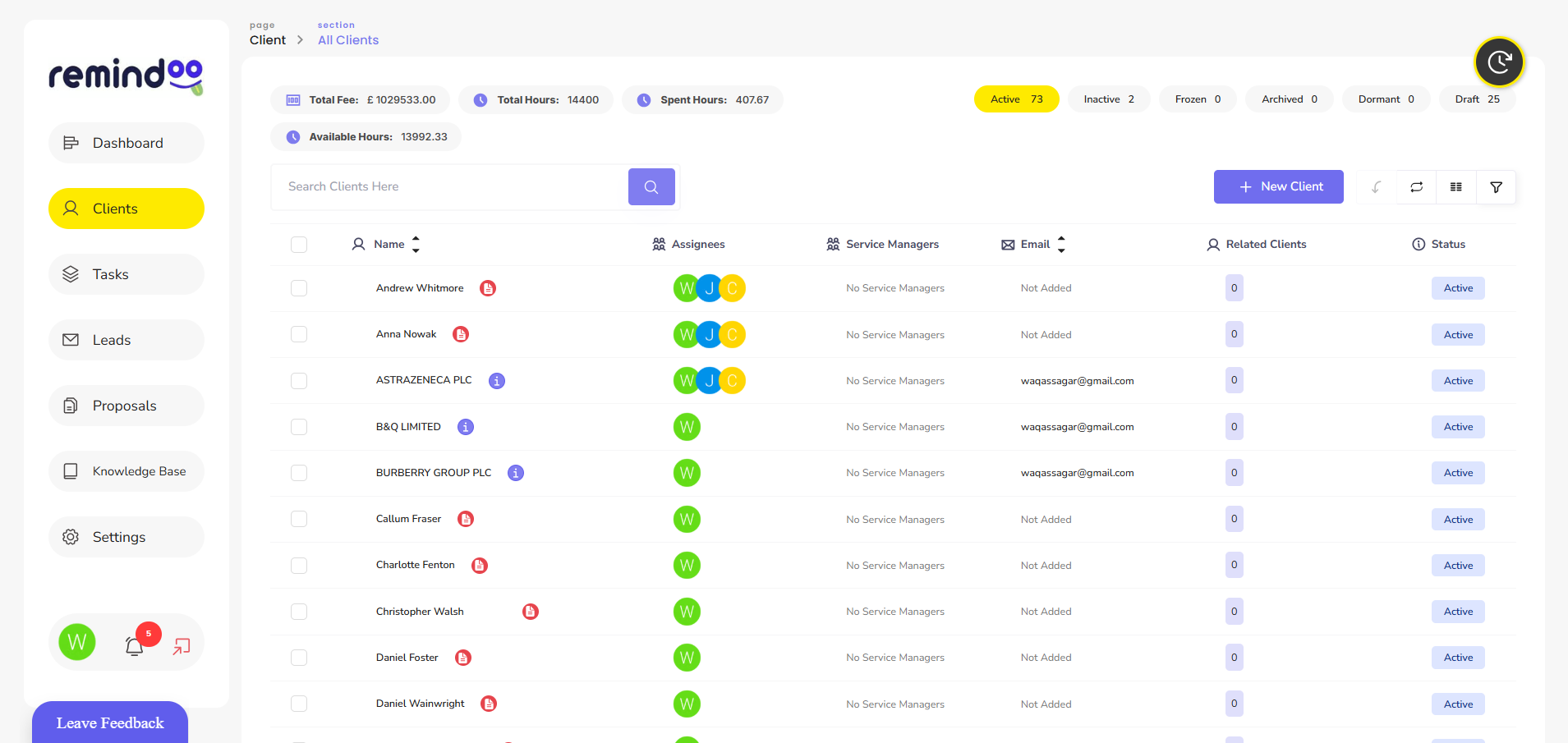
Remindoo is a practice management software for UK accountants and bookkeepers. It brings together tools that help practices manage clients, organise workflows and monitor operational responsibilities.
Rather than managing every activity through separate spreadsheets and email conversations, accounting teams can use a more structured approach to their daily work.
Some of the capabilities include:
Client Management and Client Portal
Client management tools help accounting firms organise client information and maintain a more structured approach to client-related activities.
A client portal also provides a dedicated environment for managing interactions and sharing relevant information.
Email Triage and AI Summaries
Managing a busy inbox can make it difficult to identify important client requests and outstanding actions.
Remindoo includes email triage and AI-powered summaries to help accounting professionals organise email-related work and understand key information more efficiently.
These tools can support communication management while allowing accountants to retain control over important decisions and responses.
Workflow and Task Management
Remindoo provides workflow management capabilities that help practices organise recurring activities and assign responsibilities.
Teams can structure their work, monitor task progress and identify outstanding assignments.
This is useful for practices handling several service areas, including bookkeeping, payroll, VAT and tax returns.
Proposals and AML Management
Accounting firms need organised processes when onboarding new clients.
Remindoo includes proposals and AML-related management features that support client onboarding activities and help practices organise associated information.
Firms should continue following applicable identity verification, anti-money laundering and regulatory obligations.
Analytics and Practice Visibility
Practice owners need more than a list of completed tasks to understand how their business operates.
Analytics features help provide visibility into practice activity and support more informed operational decisions.
Combined with client management and workflow tools, these capabilities help create a more structured practice management environment.
Common Mistakes to Avoid When Moving to Cloud-Based Practice Management
Implementing new software requires more than creating user accounts and transferring existing information.
Accounting firms should avoid several common mistakes.
1. Choosing software without identifying business problems: A large feature list does not necessarily mean a platform is suitable for your practice. Identify your operational requirements first.
2. Moving disorganised information into a new platform: Review existing client records, documents and workflows before migration.
3. Ignoring employee training: Employees need to understand how to use the platform and follow the agreed processes.
4. Automating unnecessary processes: Automating an inefficient workflow can make existing problems more difficult to manage. Review the process before introducing automation.
5. Overlooking security responsibilities: Review access permissions, authentication, data protection and backup arrangements.
6. Failing to review performance: Monitor how the software affects task completion, communication and administrative efficiency after implementation.
Conclusion
Cloud technology is changing how accounting firms organise their daily operations. Managing clients, coordinating employees, tracking deadlines and maintaining communication through disconnected systems can create unnecessary administrative pressure.
Cloud based accounting practice management software provides a more organised approach by bringing essential practice management activities into a central online environment.
However, choosing the right platform requires careful consideration of functionality, integrations, security, usability and scalability.
For UK accountants and bookkeepers looking to improve their operational processes, platforms such as Remindoo offer tools for client management, workflow organisation, email management and practice analytics.
The objective should not simply be to introduce more technology. It should be to build a more organised accounting practice where employees can manage responsibilities effectively and deliver a consistent service to clients.
 Portuguese
 English
 Arabic
 French
 Spanish
 Deutsch
 Turkish
 Dutch
 Italiano
 Russian
 Romaian
 Portuguese (Brazil)
 Greek