
Client Management Software for Accountants: A Complete Guide to Managing Client Relationships
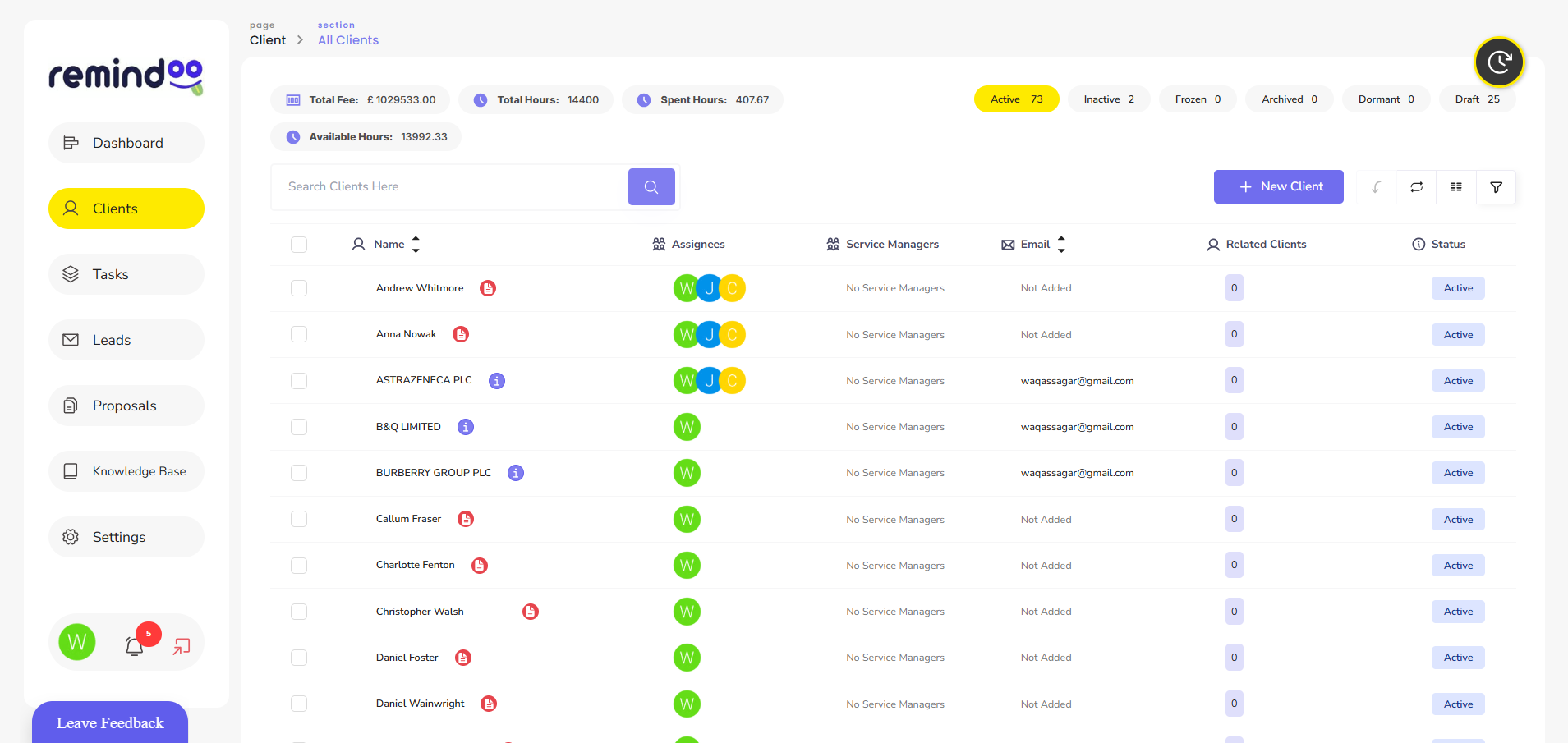
Managing an accounting practice involves much more than preparing tax returns, submitting VAT returns and maintaining financial records. Accountants must also manage client information, respond to enquiries, track deadlines, request documents and maintain regular communication. When these responsibilities are spread across emails, spreadsheets and separate applications, important information can become difficult to manage.
This is where client management software for accountants becomes valuable. It provides a central place to organise client information, monitor ongoing work, manage communication and coordinate routine administrative activities.
For accounting firms and bookkeeping practices, the right system can improve visibility across client relationships while reducing repetitive administrative work. Instead of relying on scattered records, practice owners and their teams can work from organised client profiles and structured workflows.
This guide explains how client management software works, which features matter most, how it supports accounting teams and what practices should consider when choosing a suitable solution.
What Is Client Management Software for Accountants?
Client management software for accountants is a digital system that helps accounting professionals organise and manage relationships with their clients. It stores relevant client information, tracks communication, records outstanding requests and provides visibility into ongoing activities.
Unlike basic contact management tools, accounting-focused software is designed around the operational requirements of accounting and bookkeeping practices.
For example, an accountant might need to manage:
-
Client contact details and business information.
-
VAT registration and accounting periods.
-
Corporation Tax and Self Assessment deadlines.
-
Requested financial documents.
-
Client emails and communication history.
-
Engagement information and service requirements.
-
Outstanding tasks and follow-up activities.
Having this information organised in one system makes it easier for employees to understand each client's current position without searching through multiple platforms.
Client management software can also connect with other practice management functions, including workflow management, document handling, task allocation and automated reminders.
Why Do Accounting Practices Need Dedicated Client Management Software?
Accounting firms often manage dozens or hundreds of clients, each with different accounting requirements and reporting deadlines. As a practice grows, keeping track of every relationship becomes increasingly difficult.
Manual processes may work for a small client base, but they can create operational problems as workloads increase.
1. Client Information Becomes Difficult to Track
Client details are often stored across spreadsheets, email inboxes, shared folders and individual employee records. This makes it difficult to identify the latest information.
A centralised client management system provides a consistent record for each client. Employees can access relevant contact details, service information, communication history and outstanding activities from one place.
2. Important Client Requests Can Be Missed
Accountants regularly request bank statements, invoices, receipts, payroll information and other supporting documents.
Without a structured tracking process, employees may forget which documents have been received and which clients still need follow-up messages.
Client management software helps practices monitor outstanding requests and identify clients who require attention.
3. Communication Becomes Fragmented
When different employees communicate with the same client, important details can become scattered across separate email conversations.
A system that maintains communication records helps authorised team members understand previous discussions and continue conversations with the correct context.
4. Administrative Work Increases as the Practice Grows
Adding more clients also increases the number of emails, reminders, document requests and routine follow-ups.
Automating suitable administrative activities can reduce repetitive work and allow accountants to spend more time on accounting, tax planning and client support.
Key Features to Look for in Client Management Software for Accountants
Not every client management platform offers the same functionality. Accounting practices should prioritise features that address their daily operational requirements rather than selecting software based on the number of available tools.
The following features can help create a more organised client management process.
1. Centralised Client Database
A centralised client database provides a single location for storing and accessing client information.
Useful information to maintain includes:
-
Client names, contact details and business addresses.
-
Company registration and business details.
-
Accounting services provided.
-
Tax registration information.
-
Assigned accountants and account managers.
-
Important dates and internal notes.
A well-organised database reduces duplicated records and makes client information easier to retrieve.
2. Client Communication Management
Effective communication is essential for maintaining strong client relationships. Accountants regularly discuss tax obligations, outstanding documents, financial information and upcoming deadlines.
Client management software should help teams maintain communication records and track previous interactions.
Useful communication capabilities include:
-
Recording client conversations.
-
Managing email correspondence.
-
Tracking unanswered enquiries.
-
Assigning communication follow-ups.
-
Keeping relevant team members informed.
These features help prevent repeated questions and reduce confusion when multiple employees work with the same client.
3. Task and Workflow Management
Every accounting client generates recurring activities. These may include preparing accounts, reviewing bookkeeping records, processing payroll and completing tax submissions.
Task management features help accountants organise these activities into manageable workflows.
For example, a VAT return workflow might include:
-
Request financial records from the client.
-
Receive invoices and bank statements.
-
Review and reconcile transactions.
-
Prepare the VAT return.
-
Obtain approval where required.
-
Submit the return.
-
Record completion and schedule the next period.
A structured workflow makes responsibilities clearer and helps managers monitor progress across the practice.
4. Automated Reminders and Notifications
Accountants regularly follow up with clients about missing information, upcoming deadlines and outstanding tasks.
Automated reminders can reduce the need to send every follow-up email manually.
A suitable system should support reminders for:
-
Missing client documents.
-
Upcoming tax deadlines.
-
Outstanding approvals.
-
Unanswered communications.
-
Recurring accounting activities.
-
Internal task deadlines.
Automation should remain configurable. Client requirements differ, so practices should be able to adjust reminder schedules and messages.
5. Document Management
Document collection is a significant part of accounting practice administration.
Clients may need to provide bank statements, purchase invoices, sales records, payroll documents and other supporting information.
Document management capabilities help practices organise files and monitor whether requested information has been received.
Look for functionality such as:
-
Organised client document folders.
-
Secure file uploads.
-
Document status tracking.
-
Access permissions.
-
File version management.
-
Searchable document records.
A secure document management process also reduces the need to exchange sensitive financial information through unsuitable communication channels.
6. Client Portal Access
A client portal provides a dedicated online space where clients can interact with their accounting practice.
Depending on the software, clients may be able to upload documents, review requests, access shared information and check the progress of certain activities.
A portal can improve the experience for clients who prefer digital communication and want a clear way to share information with their accountants.
7. Reporting and Practice Insights
Practice managers need visibility into client activity and team workloads.
Reporting features can help identify:
-
Outstanding client requests.
-
Overdue internal tasks.
-
Workloads assigned to individual employees.
-
Clients awaiting document submission.
-
Completed and pending activities.
-
Recurring workflow bottlenecks.
These insights help managers identify operational problems and make better decisions about workload distribution.
How Client Management Software Improves Accounting Practice Efficiency
The benefits of client management software extend beyond storing contact details. When the system is integrated into daily operations, it can improve how accounting teams organise their work.
Here are some important areas where it can make a difference.
Better Organisation Across Multiple Clients
Managing multiple clients requires accountants to switch between different records, emails and tasks throughout the day.
A centralised platform provides a clearer overview of client relationships and ongoing activities.
Employees can identify which clients need attention, which documents remain outstanding and which tasks are approaching their deadlines.
Reduced Manual Administrative Work
Manual follow-ups, repetitive data entry and task updates consume time that could be spent on professional accounting work.
Automated workflows can handle suitable routine activities, such as sending reminders and creating recurring tasks.
This allows employees to focus on activities that require professional judgement and direct client support.
Improved Team Collaboration
Accounting practices often assign different responsibilities to different employees.
For example, one employee may manage bookkeeping, another may handle payroll, while a senior accountant reviews year-end accounts.
Client management software can help teams coordinate these responsibilities through task assignments, shared records and progress updates.
This reduces dependency on individual employees having to remember every client interaction.
More Consistent Client Communication
Clients expect timely responses and clear updates about their accounting work.
A structured communication process helps practices maintain consistent contact, even when multiple team members are involved.
Keeping communication records also makes it easier to understand previous requests and avoid unnecessary repetition.
Greater Visibility of Client Workloads
Practice owners need to understand how much work is pending and whether employees have sufficient capacity.
A centralised dashboard can provide an overview of active tasks, outstanding requests and approaching deadlines.
This information supports workload planning and helps managers identify areas that require additional attention.
Client Management Software vs Spreadsheets and Manual Tracking
Some accounting practices still rely on spreadsheets, email folders and shared documents to manage their clients.
These methods can be useful when the client base is small and processes are straightforward. However, they become harder to maintain as the practice expands.
|
Area |
Spreadsheets and manual tracking |
Dedicated client management software |
|---|---|---|
|
Client information |
Manually maintained |
Centralised records |
|
Communication |
Separate email conversations |
Organised communication records |
|
Task tracking |
Manual updates |
Structured task management |
|
Reminders |
Manually scheduled |
Automated reminders where supported |
|
Team collaboration |
Shared files and messages |
Shared workflows and assignments |
|
Reporting |
Manual preparation |
Available system reports |
|
Scalability |
Increasing administrative effort |
More structured processes |
The right choice depends on the practice's size, workload and operational requirements.
A small firm with a limited client base may manage effectively with basic tools. A growing practice handling multiple services and recurring deadlines may benefit from dedicated software.
How to Choose the Right Client Management Software for an Accounting Firm
Selecting software requires more than comparing feature lists. The platform should support the practice's existing processes and remain suitable as its client base grows.
Consider the following factors before making a decision.
Understand Your Practice's Requirements
Start by identifying the administrative problems affecting your team.
For example:
-
Are client records spread across different systems?
-
Do employees frequently chase missing documents?
-
Are important client emails difficult to locate?
-
Is management struggling to monitor outstanding tasks?
-
Are recurring activities being tracked manually?
Understanding these problems will help you identify which software capabilities are essential.
Check Accounting-Specific Functionality
General CRM platforms may offer contact management and sales tracking, but accounting practices have additional operational requirements.
Look for features that support client records, accounting workflows, recurring tasks, document requests and deadline management.
The software should complement the way your practice operates.
Review Data Security and Access Controls
Accounting firms handle confidential financial and personal information. Data security should therefore be a priority when selecting a platform.
Check whether the provider offers:
-
Role-based access permissions.
-
Secure authentication.
-
Encryption for stored and transferred data.
-
Regular backups.
-
Activity logs.
-
Clear data retention and deletion policies.
Also review the provider's data processing arrangements and responsibilities under applicable data protection requirements.
Evaluate Integration Capabilities
Accounting practices frequently use several applications for bookkeeping, payroll, tax preparation, communication and document storage.
Software integrations can reduce duplicate data entry and improve information sharing between systems.
Check compatibility with the tools already used by your practice before committing to a platform.
Consider Ease of Use
A system with extensive functionality will not deliver much value if employees struggle to use it.
Choose software with an intuitive interface, clear navigation and useful onboarding support.
Consider testing the platform with a small group of employees before introducing it across the entire practice.
Compare Pricing and Scalability
Software pricing may depend on the number of users, active clients, available features or subscription level.
Compare the total cost with the operational value the platform provides.
Also consider whether the system can accommodate additional employees, clients and workflows without requiring a complete change of platform.
How Remindoo Supports Client Management for Accounting Practices
An example of accounting-focused practice management
Remindoo is designed to help accounting firms and bookkeeping practices organise their operational activities.
Rather than treating client management as an isolated function, Remindoo brings together several practice management capabilities that support everyday accounting operations.
Its features include:
Client Management
Client management functionality helps accounting practices organise client information and maintain a clearer overview of their relationships.
Having structured client records makes it easier for employees to understand client requirements and coordinate ongoing work.
Client Portal
The client portal provides a digital communication and document-sharing environment.
It can support the exchange of information between accounting practices and their clients, helping organise document collection and client interactions.
Workflow Management
Recurring accounting activities require clear processes and defined responsibilities.
Remindoo's workflow functionality helps practices organise work into structured activities, making it easier to monitor progress and coordinate tasks across teams.
Email Triage
Accounting teams receive enquiries and requests from multiple clients throughout the working day.
Email triage helps organise incoming communications and supports a more structured approach to handling client messages.
AI-Powered Summaries
AI summaries can help employees understand relevant information more quickly by reducing the need to review lengthy communication histories manually.
This can support more efficient internal coordination, although important client information should always be checked before decisions are made.
Automated Reminders
Reminders help practices keep track of upcoming activities and follow-ups.
For accounting firms managing recurring tax and compliance work, organised reminders can support better deadline awareness and reduce reliance on manual tracking.
By bringing client management, email handling, workflow management and other practice functions together, Remindoo provides an integrated environment for managing accounting practice operations.
Explore Remindoo to learn more about its practice management features.
The Role of Client Management Software in Making Tax Digital
Making Tax Digital (MTD) is changing how many UK businesses maintain digital records and report information to HMRC.
From 6 April 2026, MTD for Income Tax applies to qualifying sole traders and landlords with qualifying income above £50,000. The threshold is scheduled to reduce to £30,000 from April 2027 and £20,000 from April 2028.
These changes increase the importance of organised client records, timely communication and effective coordination between accountants and their clients.
Client management software can support the administrative side of this process by helping practices:
-
Identify clients who need additional support.
-
Organise client information.
-
Track outstanding documents.
-
Schedule communication and follow-ups.
-
Coordinate responsibilities between team members.
-
Monitor related internal activities.
However, client management software is not automatically MTD-compatible accounting software. Practices must separately verify whether their chosen accounting and tax software meets HMRC's requirements.
For further information, read the official HMRC guidance on preparing your accounting practice for Making Tax Digital.
Common Mistakes to Avoid When Implementing Client Management Software
Introducing new software does not automatically improve practice operations. Accounting firms should establish clear processes before moving their client management activities to a new platform.
Avoid these common mistakes.
1. Migrating Incomplete Client Records
Moving inaccurate or outdated information into a new platform can create further administrative problems.
Review existing records, remove unnecessary duplicates and verify important client details before migration.
2. Choosing Software Without Considering Workflows
A platform may offer many features but still fail to support the practice's actual processes.
Evaluate how the software handles recurring accounting work, document collection, communication and internal task allocation.
3. Providing Insufficient Staff Training
Employees need to understand how to use the system correctly.
Provide practical training covering client records, task assignments, document management and communication procedures.
4. Ignoring Data Access Permissions
Not every employee needs access to every client record.
Set appropriate permissions according to job responsibilities and review access when employees join, change roles or leave the practice.
5. Automating Every Communication
Automation is useful for routine reminders and administrative updates. However, sensitive tax matters, complaints and complex client queries often require personal attention.
Use automation to support client relationships rather than replace professional communication.
Conclusion
Effective client management is an important part of running an organised accounting practice. As client numbers increase, relying on spreadsheets, separate email conversations and manual reminders can make everyday administration more difficult.
Client management software for accountants provides a structured way to organise client information, coordinate communication, manage documents and monitor ongoing work.
When selecting a platform, accounting firms should prioritise practical functionality, data security, integration capabilities and ease of use.
Solutions such as Remindoo bring client management together with workflow management, email triage, client portals and automation features. These capabilities can help accounting practices establish more consistent processes and manage their growing client workloads.

 English
 Arabic
 French
 Spanish
 Portuguese
 Deutsch
 Turkish
 Dutch
 Italiano
 Russian
 Portuguese (Brazil)
 Greek