
Cloud-Based Accounting Practice Management Software: Features, Benefits and Implementation Guide
Accounting firms manage multiple clients, deadlines, financial records and compliance responsibilities every day. As practices grow, coordinating these activities through spreadsheets, emails and disconnected applications can become increasingly difficult. Accountants need reliable systems to organise their work, monitor progress and maintain communication with clients.
Cloud based accounting practice management software provides a central platform for managing these responsibilities online. It allows accounting professionals to access practice information, organise client work, assign tasks and monitor workflows without relying entirely on office-based systems.
Cloud technology has also changed how accounting teams collaborate. Partners, managers and employees can access relevant information from different locations, making it easier to coordinate workloads and manage deadlines.
Understanding the features, benefits and limitations of cloud-based practice management systems can help accounting firms choose technology that supports their operational requirements.
What Is Cloud-Based Accounting Practice Management Software?
Cloud-based accounting practice management software is an online platform that helps accountants manage the administrative and operational activities of an accounting practice.
Unlike traditional desktop applications that depend on locally installed software, cloud-based platforms are hosted online. Users can access the system through an internet connection and an authorised device.
These platforms typically bring several practice management activities together, including:
-
Client information and relationship management.
-
Task allocation and workflow tracking.
-
Document storage and sharing.
-
Deadline and compliance management.
-
Team collaboration.
-
Client communication.
-
Practice performance reporting.
-
Automated reminders and notifications.
For example, an accounting firm managing 150 clients might use a cloud platform to monitor bookkeeping assignments, VAT returns, payroll deadlines and annual accounts preparation. Team members can see their assigned responsibilities, while managers can review outstanding work.
The objective is to create a more organised working environment where important practice information is accessible and easier to manage.
Why Are Accounting Firms Moving to Cloud-Based Practice Management?
Traditional practice management often involves separate spreadsheets, email conversations, shared folders and manually updated task lists.
Although these methods can work for smaller workloads, they become harder to maintain as the number of clients and employees increases.
Cloud-based systems provide a central working environment that can reduce unnecessary administrative activity.
1. Access Practice Information Remotely
Cloud platforms allow authorised users to access practice information without being physically present in the office.
This is particularly useful for accounting firms with remote employees, multiple offices or flexible working arrangements.
An accountant can review an assigned task, check a client's documents or update work progress from an authorised device.
2. Reduce Manual Administration
Manual administration takes time away from accounting work and client services.
A practice management system can automate routine activities such as task reminders, recurring workflows, notifications and deadline tracking.
For example, an accounting firm can establish a recurring VAT workflow that reminds the responsible employee when a client's next VAT return needs attention.
Automation helps reduce repetitive administration, although important calculations and compliance decisions still require appropriate professional checks.
3. Improve Team Coordination
Accounting work often passes through several stages and employees.
A bookkeeping assignment might begin with a junior accountant, move to a manager for review and then require approval before completion.
Cloud-based practice management software makes it easier to assign responsibilities, track progress and identify work awaiting review.
Managers can also identify overloaded employees and redistribute tasks where necessary.
4. Improve Client Communication
Scattered email conversations can make it difficult to identify outstanding client requests.
Centralised client management helps accounting teams organise communication, record important updates and monitor information requests.
Some platforms also provide client portals where customers can securely exchange documents and access relevant information.
Essential Features of Cloud-Based Accounting Practice Management Software
Not every cloud platform offers the same functionality. Accounting firms should assess features according to their client base, service offerings and internal processes.
The following capabilities are particularly useful.
Client Management and Centralised Records
Client management is one of the most important functions of practice management software.
A centralised client database helps accounting firms organise essential information, including:
-
Client contact details.
-
Business information.
-
Assigned accountants and managers.
-
Service agreements.
-
Communication history.
-
Compliance requirements.
-
Important deadlines.
-
Outstanding documents and requests.
Having these details in one location makes it easier for authorised employees to understand a client's requirements without searching through multiple systems.
It can also support consistent service delivery when responsibilities transfer between team members.
Workflow Management and Task Automation
Workflow management helps firms organise accounting activities into defined stages.
For example, a year-end accounts workflow might include document collection, bookkeeping review, accounts preparation, manager review and final client approval.
Each stage can have an assigned employee, deadline and completion status.
Automation can support recurring processes by generating tasks, sending reminders and notifying relevant team members.
A well-designed workflow reduces the risk of overlooked responsibilities and gives managers a clearer view of work in progress.
Document Management and Secure File Sharing
Accounting firms handle sensitive financial and personal information. Managing these documents through unstructured email attachments can create unnecessary administrative and security risks.
Cloud-based document management allows authorised users to organise, store and retrieve files through a central platform.
Useful capabilities include:
-
Secure document uploads.
-
Organised client folders.
-
Access permissions.
-
Document request notifications.
-
File sharing.
-
Version management.
-
Activity records.
Firms should evaluate how each platform protects stored information and controls access to confidential client documents.
Deadline and Compliance Tracking
Accounting practices work with recurring statutory and administrative deadlines.
These may include VAT returns, Corporation Tax, Self Assessment, payroll submissions and Companies House filing obligations.
A practice management system can help firms record relevant deadlines and allocate responsibility for completing each task.
Automated reminders can notify employees before important dates, while managers can review overdue or incomplete assignments.
However, software reminders should support, rather than replace, professional oversight of statutory obligations.
Reporting and Practice Performance Analytics
Practice managers need reliable information to understand how their teams and operations are performing.
Reporting features can help monitor:
-
Number of active clients.
-
Completed and outstanding tasks.
-
Employee workloads.
-
Overdue assignments.
-
Workflow completion rates.
-
Time spent on activities.
-
Client service performance.
These reports can support operational decisions and help identify processes that require improvement.
For example, consistently delayed bookkeeping assignments may indicate that a particular team needs additional resources or a more efficient document collection process.
Client Portals and Online Collaboration
A client portal provides a controlled online environment where accounting firms and their clients can exchange information.
Depending on the platform, clients may be able to upload documents, respond to information requests and view relevant updates.
This can reduce the need for repeated email follow-ups and help keep client information organised.
Accounting firms should assess portal permissions, authentication methods and document protection before making the feature available to clients.
How Cloud-Based Practice Management Supports Making Tax Digital
Making Tax Digital (MTD) is an important consideration for UK accounting firms.
HMRC's digital tax initiatives require businesses and individuals within relevant scopes to maintain digital records and use compatible software for applicable tax obligations.
Cloud-based practice management software can support the administrative side of these processes by helping accountants organise client information, assign responsibilities and monitor compliance workflows.
However, practice management software and MTD-compatible accounting software are not necessarily the same thing.
A practice management platform may coordinate tasks without directly maintaining the digital accounting records or submitting tax information to HMRC.
Accounting firms should check whether their chosen software integrates with suitable MTD-compatible applications and whether the complete workflow meets the relevant HMRC requirements.
For official information, consult GOV.UK guidance on Making Tax Digital for Income Tax.
Cloud Security: Protecting Accounting Practice and Client Information
Moving practice information online requires careful consideration of data protection and cybersecurity.
Accounting firms hold confidential information, including financial records, personal details and business documents. They must take appropriate steps to protect this information.
Before choosing cloud-based accounting practice management software, firms should assess the following security features.
User Access Controls
Not every employee needs access to every client record.
Role-based permissions can restrict access according to an employee's responsibilities. For example, a payroll administrator may need access to payroll information but not every document held by the accounts department.
Multi-Factor Authentication
Multi-factor authentication (MFA) adds an additional verification step when users access an account.
It can reduce the risk of unauthorised access when login credentials are compromised.
Data Encryption
Firms should understand how their provider protects information during transmission and storage.
Encryption helps protect data against unauthorised access, although it should form part of a wider security strategy.
Backup and Recovery Procedures
Accounting firms should check how frequently information is backed up, how long backups are retained and what procedures are available if data becomes unavailable.
They should also understand the provider's recovery arrangements and service availability commitments.
UK GDPR and Data Protection
Accounting firms must consider their responsibilities under applicable data protection legislation when processing client and employee information.
Depending on the arrangement, the accounting practice may act as a data controller and the software provider may act as a data processor.
Firms should review data processing agreements, retention arrangements, access controls and international data transfer provisions where relevant.
Cloud-Based vs Traditional Desktop Practice Management Software
Choosing between cloud-based and desktop software depends on the firm's operational needs.
| Comparison | Cloud-based software | Traditional desktop software |
|---|---|---|
| Accessibility | Access through authorised internet-connected devices | Usually dependent on installed systems or configured remote access |
| Updates | Often managed by the provider | May require manual updates |
| Collaboration | Supports online team collaboration | May require additional infrastructure |
| Data storage | Hosted cloud infrastructure | Often stored locally or on internal servers |
| Maintenance | Much of the infrastructure maintenance is provider-managed | More responsibility may sit with the firm |
| Scalability | Often supports adding users and services through subscription plans | May require additional installations or infrastructure |
Cloud software is not automatically better for every practice. Firms should consider internet reliability, integration requirements, data security, provider support and the total cost of ownership before making a decision.
How to Choose the Right Cloud-Based Practice Management Software
Selecting a platform requires more than comparing feature lists. Accounting firms should understand their existing processes and identify the problems they want technology to solve.
1. Assess Your Practice's Requirements
Start by reviewing the firm's client numbers, team size and service offerings.
A small bookkeeping practice may prioritise client records and task reminders, while a larger accountancy firm may need advanced reporting, workflow automation and multiple user permissions.
2. Review Integration Capabilities
Accounting practices frequently use separate applications for bookkeeping, payroll, tax preparation, document storage and communication.
Check whether the practice management platform integrates with the tools already used by the firm.
Poor integration can create duplicate records and unnecessary manual work.
3. Evaluate Automation Features
Identify repetitive activities that could benefit from automation.
These might include recurring client tasks, document requests, workflow notifications and deadline reminders.
Choose software that supports the firm's actual working processes rather than introducing unnecessary complexity.
4. Check Security and Data Protection
Review the provider's security documentation, access controls, backup policies and data processing arrangements.
Consider whether the platform supports the firm's confidentiality and regulatory requirements.
5. Compare Pricing and Scalability
Subscription pricing may depend on the number of users, active clients, storage requirements or available features.
Look beyond the initial subscription fee and consider implementation, training, integrations and additional services.
6. Test the Platform Before Implementation
A demonstration or trial can help employees understand how the system works.
Test common activities such as creating a client record, assigning a task, requesting documents and monitoring a deadline.
Involve employees who will use the platform regularly so that practical concerns can be identified early.
How Remindoo Helps Accountants Manage Practice Operations
Remindoo is a practice management software platform for UK accountants and bookkeepers.
It brings important practice operations together to help accounting teams organise client information, manage workflows and monitor outstanding responsibilities.
Its features address several common administrative challenges faced by growing accounting practices.
Client Management
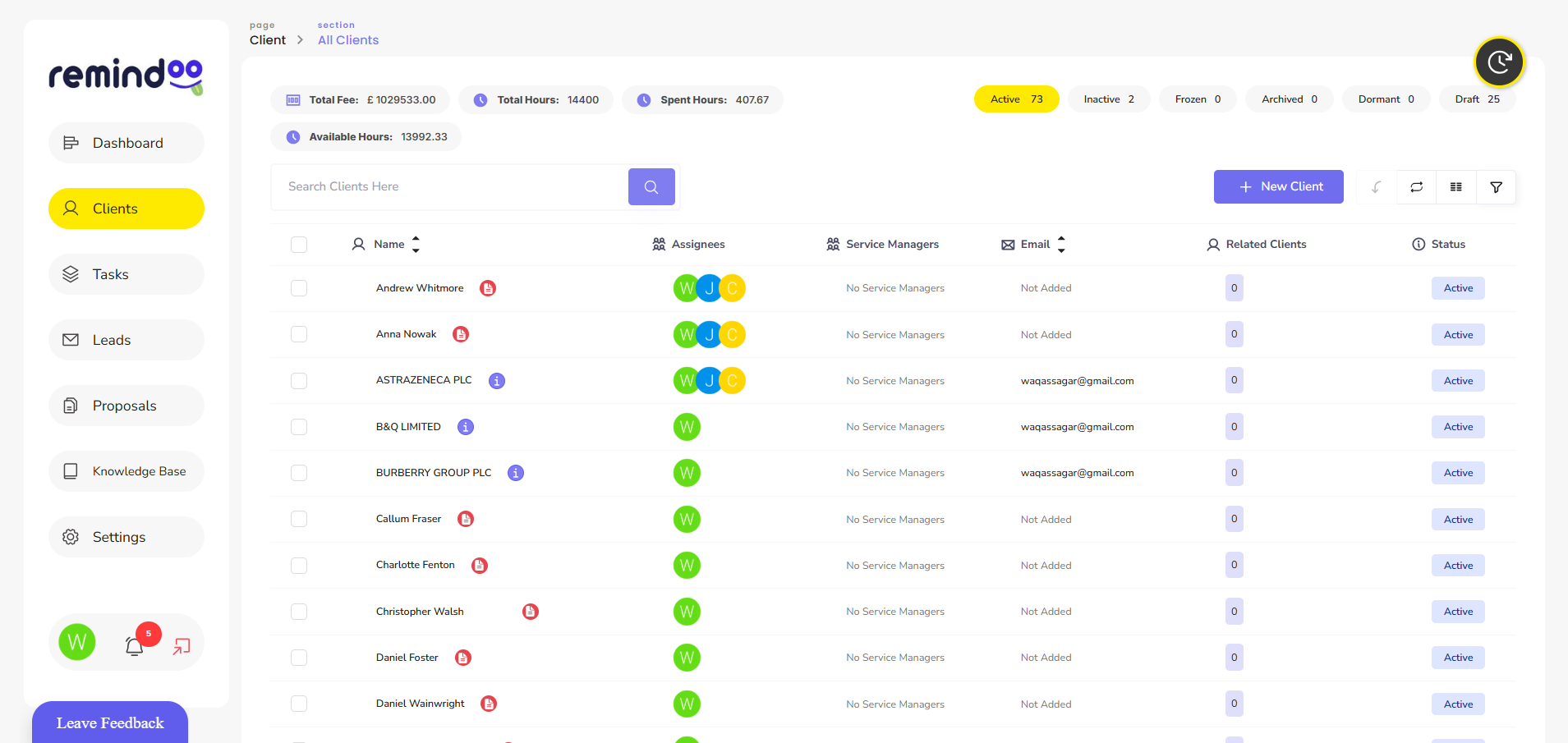
Remindoo provides client management capabilities that help accounting teams organise client information and maintain visibility over their responsibilities.
A centralised approach can make it easier to manage client relationships and coordinate recurring accounting services.
Workflow Management
Accounting firms can use workflow features to organise tasks and monitor their progress.
This helps employees understand their responsibilities while allowing managers to review outstanding work.
Email Triage and AI Summaries
Managing a high volume of client emails can consume valuable working time.
Remindoo includes email triage and AI summary capabilities designed to help accounting professionals organise communication and understand important information more efficiently.
Accountants should still review AI-generated summaries and verify important information before making professional decisions.
Proposals and AML Management
Client onboarding involves several administrative and compliance-related activities.
Remindoo includes proposal and AML-related functionality to support these processes and help practices organise relevant information.
Firms remain responsible for ensuring that their client due diligence and anti-money laundering procedures meet applicable legal requirements.
Analytics and Reporting
Practice managers need visibility into their team's work and outstanding responsibilities.
Remindoo includes analytics capabilities that help accounting firms monitor practice activities and gain a clearer understanding of operational performance.
Client Portal and Companies House Integration
A client portal can support document exchange and communication between accountants and their customers.
Remindoo also offers Companies House synchronisation functionality, helping practices manage relevant company information within their working environment.
The suitability of individual features will depend on the firm's processes and software requirements.
Common Mistakes to Avoid When Implementing Cloud Practice Management Software
Even a capable software platform may fail to improve operations if the implementation process is poorly planned.
Accounting firms should avoid several common mistakes.
Migrating incomplete client records: Moving inaccurate information into a new platform can create problems from the beginning. Review existing records before migration.
Automating inefficient workflows: Automating an unnecessarily complicated process does not make it efficient. Simplify existing procedures before configuring automation.
Ignoring employee training: Employees need to understand how to use the platform and follow consistent processes.
Overlooking software integrations: Disconnected systems can create duplicate information and additional administration.
Giving excessive user access: Apply appropriate permissions to protect confidential client and employee information.
Failing to review performance: Monitor whether the new system actually improves task completion, communication and workload management.
Frequently Asked Questions
What is cloud-based accounting practice management software?
Cloud-based accounting practice management software is an online platform that helps accountants manage clients, workflows, documents, deadlines and team responsibilities. It allows authorised users to access practice information through an internet connection.
Is cloud-based practice management software suitable for small accounting firms?
Yes. Smaller accounting firms can use cloud platforms to organise client records, manage recurring tasks and reduce manual administration. The most suitable platform depends on the firm's size, budget and operational requirements.
What is the difference between accounting software and practice management software?
Accounting software focuses on financial activities such as bookkeeping, transaction processing, financial reporting and tax calculations. Practice management software focuses on running the accounting firm, including client management, workflows, employee responsibilities and deadlines. Some platforms offer integrations between both types of software.
Is cloud accounting practice management software secure?
It can provide strong security when supported by appropriate encryption, access controls, multi-factor authentication, backups and reliable data protection procedures. Accounting firms should assess the provider's security arrangements before storing confidential information.
Can accountants access cloud practice management software remotely?
Yes. Cloud platforms generally allow authorised employees to access relevant practice information from different locations using internet-connected devices. Access depends on the provider's system requirements and security settings.
Does cloud practice management software support Making Tax Digital?
Some platforms support MTD-related workflows or integrate with MTD-compatible accounting applications. However, practice management functionality alone does not establish that a platform can maintain digital tax records or submit information to HMRC. Firms should verify the specific software's compatibility.
What features should accountants look for in cloud practice management software?
Important features include client management, workflow automation, task allocation, document management, deadline tracking, reporting, secure access and integrations with accounting applications.
Conclusion
Cloud technology has changed how accounting practices organise their daily operations. Instead of relying on disconnected spreadsheets, emails and manual reminders, firms can use centralised platforms to manage clients, coordinate employees and monitor recurring responsibilities.
Choosing the right cloud based accounting practice management software requires an understanding of the firm's operational needs, security requirements and existing technology.
Features such as workflow automation, client management, document sharing and reporting can help accounting teams establish more organised processes.
Platforms such as Remindoo bring these capabilities together in an environment designed for accountants and bookkeepers. By selecting suitable technology and implementing it carefully, accounting practices can improve administrative efficiency, support collaboration and create more consistent client service.

 Arabic
 French
 Spanish
 Portuguese
 Deutsch
 Turkish
 Dutch
 Italiano
 Russian
 Romaian
 Portuguese (Brazil)
 Greek