

Accounting Practice Management Software: How It Helps Accountants Run an Efficient Practice
Running an accounting practice involves much more than preparing accounts and submitting tax returns. Accountants must manage client relationships, organise documents, monitor statutory deadlines, allocate work and coordinate employees. As a practice grows, keeping these activities organised through spreadsheets, emails and separate applications can become increasingly difficult.
Accounting practice management software helps accounting firms bring these activities together in a central system. Instead of relying on disconnected tools, accountants can manage client information, recurring tasks, workflows, deadlines and team communication from one platform.
The right software can improve visibility across the practice, reduce repetitive administration and help employees understand which tasks need attention. It also gives practice owners a clearer picture of workloads, outstanding jobs and operational performance.
Understanding the available features and how they fit into everyday accounting work can help firms choose a system that supports their current operations and future growth.
What Is Accounting Practice Management Software?
Accounting practice management software is a digital platform designed to organise and manage the operational activities of an accounting firm.
It provides a central place to coordinate client information, employee responsibilities, recurring accounting jobs and internal processes. Depending on the platform, it may also include document management, client communication, proposals, engagement letters, time recording and performance reporting.
For example, an accounting firm providing bookkeeping, payroll, VAT and annual accounts services needs to manage different tasks for each client. Each service has its own requirements, information requests and completion dates.
Practice management software helps organise these responsibilities through structured workflows and assigned tasks.
Common capabilities include:
-
Client relationship and information management.
-
Task creation and allocation.
-
Recurring workflow automation.
-
Internal and statutory deadline tracking.
-
Document storage and sharing.
-
Client communication and reminders.
-
Employee workload management.
-
Time recording and performance reporting.
-
Proposals and engagement letter management.
The exact functionality varies between providers, so accounting firms should assess whether a platform supports their actual working processes.
Why Do Accounting Firms Need Practice Management Software?
Accounting firms regularly handle multiple clients, services and deadlines. Managing these responsibilities manually can create unnecessary administration and make it difficult to identify outstanding work.
A spreadsheet might show a list of clients, while important instructions remain in email conversations and documents are stored in separate folders. Employees may also maintain individual task lists, making it harder for managers to understand overall progress.
A centralised system addresses these operational problems.
1. Manage Multiple Clients from One Platform
Client information is an essential part of accounting practice operations. Employees need access to relevant contact details, service information, previous communications and outstanding work.
Practice management software creates centralised client records that help employees find important information without searching through multiple systems.
A client profile may contain:
-
Business and contact information.
-
Services provided by the accounting firm.
-
Assigned account managers.
-
Important deadlines.
-
Outstanding tasks.
-
Communication history.
-
Relevant documents and notes.
For example, when a client requests an update about their VAT return, an employee can check the client's record and review the current task status.
This makes client information easier to access and helps maintain continuity when responsibilities move between team members.
2. Automate Recurring Accounting Tasks
Many accounting services follow predictable schedules. Bookkeeping may take place monthly, VAT returns quarterly and annual accounts once per financial year.
Creating every task manually can consume valuable administrative time.
Workflow automation allows firms to establish repeatable processes for regular services. Once a workflow is configured, the system can generate tasks according to selected dates, frequencies and conditions.
For example, a monthly bookkeeping workflow might include:
-
Request bank statements and invoices.
-
Collect missing financial information.
-
Review bookkeeping records.
-
Reconcile transactions.
-
Prepare management reports.
-
Complete an internal review.
-
Send the final reports to the client.
A standard workflow helps employees follow consistent procedures and reduces the risk of overlooking important steps.
3. Track Accounting Deadlines
Missing a statutory deadline can create problems for both an accounting firm and its clients.
Accountants must monitor different deadlines, including VAT submissions, Corporation Tax returns, Self Assessment, payroll reporting and Companies House filings.
Accounting practice management software can help firms organise these dates through centralised calendars, automated reminders and task deadlines.
A useful system should distinguish between internal completion dates and external statutory deadlines.
For example, an accountant might set an internal deadline several days before a client's VAT submission date. This provides additional time for reviewing records and resolving missing information.
Deadline tracking also helps managers identify overdue work before it becomes a larger operational problem.
4. Improve Team Collaboration and Task Allocation
Accounting practices often employ bookkeepers, payroll administrators, accountants, reviewers and client managers. Each employee may be responsible for different stages of the same job.
Without clear task allocation, responsibilities can become confusing. Two employees might work on the same task while another important job remains unassigned.
Practice management software allows managers to assign tasks to specific employees and monitor their progress.
Useful collaboration features may include:
-
Employee assignments.
-
Task priorities.
-
Progress statuses.
-
Internal comments.
-
Subtasks and checklists.
-
Team notifications.
-
Role-based permissions.
-
Reviewer and approver responsibilities.
For example, a year-end accounts job could be assigned to an accounts preparer, followed by an internal reviewer and final approver.
This creates a clearer process and helps management understand who is responsible for each stage.
Essential Features to Look for in Accounting Practice Management Software
Not every accounting practice needs the same software configuration. A small firm may prioritise client records and deadline reminders, while a larger practice may require advanced workflow automation, team reporting and capacity management.
The following features are worth evaluating before choosing a platform.
Client Management and CRM
A built-in client management system helps firms maintain organised records and track relationships throughout the client lifecycle.
Look for features such as client profiles, contact management, service allocation, communication history, onboarding records and client timelines.
A connected CRM can also help firms manage enquiries and convert prospective clients into active engagements.
Workflow and Task Automation
Workflow automation is particularly useful for firms managing recurring compliance and accounting services.
Look for configurable task templates, recurring schedules, subtasks, automatic task creation and deadline reminders.
The ability to customise workflows is important because different accounting services require different procedures.
Document Management and Client Portals
Accounting firms exchange sensitive financial documents with clients throughout the year.
A document management system helps organise files and associate them with relevant client records. A client portal can provide a more structured way to request, receive and share information.
Useful capabilities include secure document uploads, access permissions, document organisation and electronic signatures.
Firms should also assess encryption, authentication, backups and data retention arrangements before choosing a provider.
Time Tracking and Workload Management
Time recording helps accounting practices understand how much effort employees spend on different services.
For example, a firm may discover that a particular bookkeeping engagement consistently requires more hours than originally estimated.
This information can support better job planning, resource allocation and fee reviews.
Capacity management features can also help managers identify employees with excessive workloads and redistribute tasks where necessary.
Reporting and Analytics
Reporting features provide an overview of practice operations.
Useful reports may cover:
-
Total active clients.
-
Outstanding and overdue tasks.
-
Upcoming deadlines.
-
Employee workload.
-
Time recorded against client jobs.
-
Service-level performance.
-
Revenue and fee information.
-
New enquiries and client conversions.
These insights help practice owners identify operational problems and make more informed management decisions.
How Practice Management Software Supports Making Tax Digital
Making Tax Digital (MTD) has increased the importance of digital processes for UK accounting practices.
Accountants supporting clients under MTD need suitable systems for organising client information, tracking responsibilities and coordinating the work required for digital record-keeping and submissions.
Practice management software can support the administrative side of this process by helping firms:
-
Identify clients who need MTD support.
-
Allocate MTD preparation tasks.
-
Record client onboarding progress.
-
Monitor quarterly update deadlines.
-
Request outstanding financial information.
-
Track internal reviews and completion stages.
However, practice management software and MTD-compatible accounting software are not necessarily the same thing.
A practice management platform may organise workflows without directly creating digital tax records or submitting information to HMRC. Firms must check the specific MTD functionality and integrations offered by their chosen providers.
For official requirements, see the GOV.UK guidance on getting software ready for Making Tax Digital for Income Tax.
How Remindoo Helps Accounting Practices Manage Their Work
Remindoo is a practice management platform designed for UK accountants, bookkeepers and tax advisers. It brings several operational activities into one connected workspace.
Rather than managing client information, tasks, deadlines and communication through separate systems, firms can use Remindoo to coordinate their day-to-day work.
Its main capabilities include:
Centralised Client Management
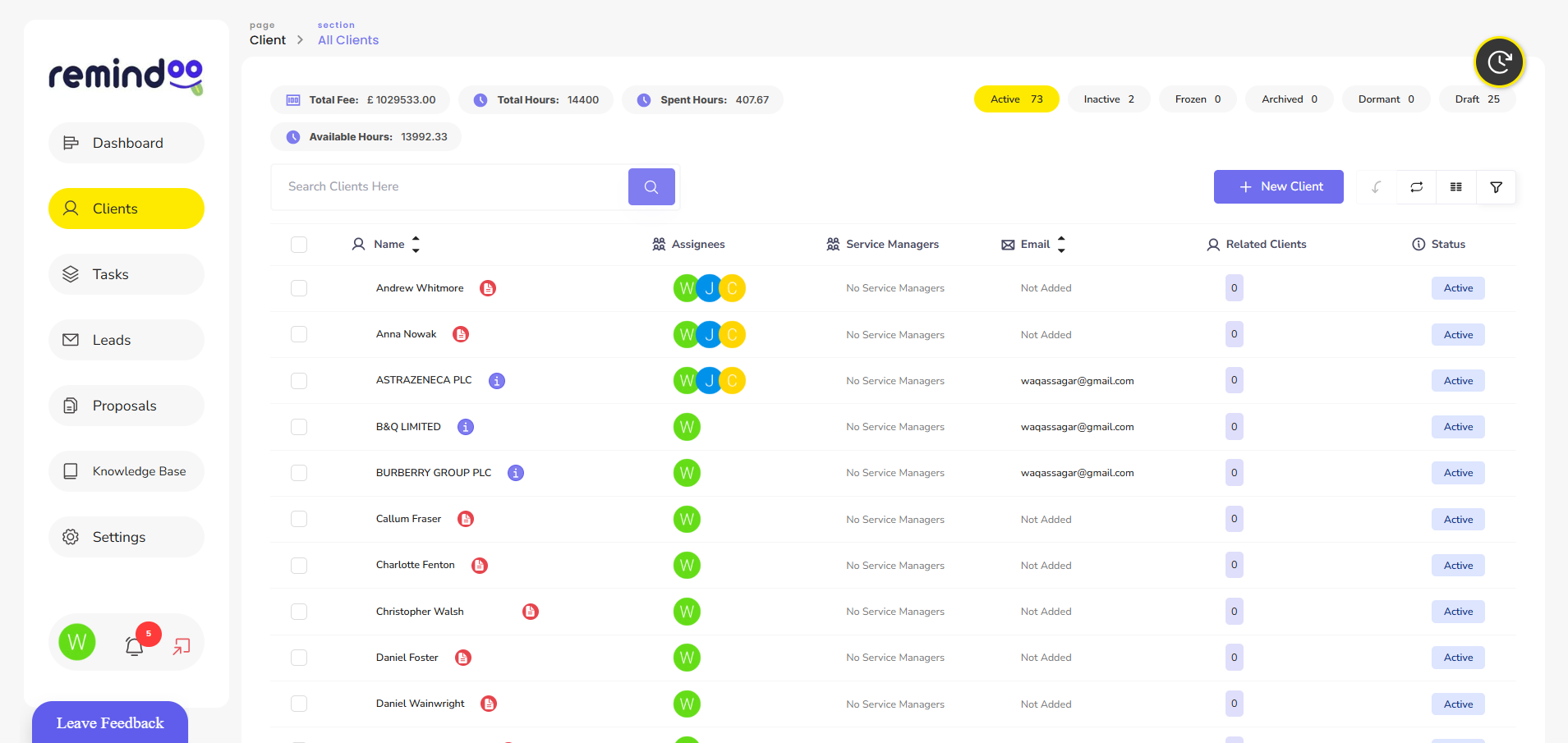
Remindoo helps accounting firms organise client information, service details, contacts, notes and important dates.
A centralised client record makes it easier for employees to access relevant information and understand the work associated with each engagement.
Task and Workflow Management
Accounting teams can create tasks, assign responsibilities, establish recurring jobs and organise work through subtasks.
For example, a firm can create a recurring VAT workflow with stages for collecting records, preparing the return, reviewing figures and completing the submission process.
Automated Reminders and Deadline Tracking
Remindoo supports internal and external deadlines, recurring tasks and reminders.
These features help employees monitor upcoming responsibilities and identify jobs that need attention.
Client Portal and Document Management
Client communication often involves repeated requests for financial information and supporting documents.
Remindoo provides a client portal where firms can organise client interactions, document requests and relevant engagement information.
This can make information collection more structured than relying entirely on email attachments.
Proposals and Engagement Letters
Managing new client enquiries is another important part of running an accounting practice.
Remindoo includes proposal and engagement management features that help firms prepare proposals, issue engagement letters and manage electronic signatures.
Connecting these activities with client onboarding can create a more consistent process from initial enquiry to active engagement.
Team Management and Performance Reporting
Practice owners need visibility into employee responsibilities, workloads and completed tasks.
Remindoo includes team management, time recording and analytics features that help managers review operational activity.
These insights can support workload planning and help identify areas where existing processes need improvement.
How to Choose the Right Accounting Practice Management Software
Selecting a suitable platform requires more than comparing feature lists. Accounting firms should consider their service structure, team size, existing systems and operational priorities.
The following steps can help with the decision.
1. Identify Your Current Operational Problems
Start by reviewing how your practice currently manages clients, deadlines, documents and employee tasks.
Identify the processes that create the most administrative work. These might include chasing client information, allocating recurring tasks or tracking overdue jobs.
Choose software that addresses these specific problems rather than paying for features your firm may never use.
2. Check Integration with Existing Software
Accounting practices often use separate applications for bookkeeping, payroll, tax preparation, email and document storage.
Check whether the practice management platform integrates with the tools your employees already use.
Also establish whether information transfers automatically or requires manual updates.
3. Review Security and Access Controls
Accounting firms handle confidential financial and personal information.
Before adopting a platform, review its security arrangements, access controls, authentication options, backup procedures and data protection documentation.
Check whether employees can be assigned different permission levels according to their responsibilities.
4. Compare Pricing Structures
Software providers may charge per user, per client or according to selected features.
Consider the total cost as your client base and team grow.
A platform that appears affordable for a small team may become expensive when additional users or modules are required.
5. Test the Software Before Migrating
A free trial or product demonstration can help employees understand how the software works in practice.
Test everyday activities such as creating a client record, assigning a task, setting a deadline, uploading a document and reviewing team workloads.
Involve employees who will use the system regularly. Their feedback can reveal practical issues that may not be obvious during a sales demonstration.
Common Mistakes to Avoid When Implementing Practice Management Software
Even suitable software may fail to improve operations if the implementation process is poorly planned.
Accounting firms should avoid several common mistakes.
Choosing software based only on price: A low subscription cost does not necessarily mean the system meets the firm's operational requirements.
Migrating without cleaning existing records: Duplicate client profiles, outdated contact information and incomplete records can create problems in the new system.
Automating inefficient processes: Automating an unclear workflow can reproduce existing problems rather than solve them.
Providing insufficient employee training: Staff need to understand how to create tasks, update records and follow established workflows.
Ignoring access permissions: Employees should only have access to the information and functions required for their roles.
Failing to review performance: Firms should regularly assess whether the software is improving task completion, communication and workload management.
Frequently Asked Questions About Accounting Practice Management Software
What does accounting practice management software do?
Accounting practice management software helps accounting firms organise client records, recurring tasks, workflows, deadlines, documents and employee responsibilities. It provides a central platform for managing everyday practice operations.
Is accounting practice management software different from accounting software?
Yes. Accounting software primarily handles financial records, bookkeeping, reconciliations and financial reporting. Practice management software focuses on running the accounting firm, including client management, task allocation, workflow coordination and deadlines. Some platforms offer integrations or overlapping functionality.
Do small accounting firms need practice management software?
Small accounting firms can benefit from practice management software when manual administration becomes difficult to manage. Features such as client records, recurring tasks and deadline reminders can help smaller teams organise their work as their client base grows.
Can practice management software automate accounting workflows?
Yes. Many platforms support recurring tasks, reusable workflow templates, automatic task creation and reminders. The available automation depends on the provider and the configuration of the system.
Does practice management software support Making Tax Digital?
Some platforms provide features that help accountants organise MTD-related client work. However, not every practice management platform is MTD-compatible for digital record-keeping and submissions. Firms should verify the software's specific functionality against HMRC requirements.
What features should accountants prioritise?
Most accounting practices should prioritise client management, task allocation, recurring workflows, deadline tracking, document management and team collaboration. Larger practices may also benefit from capacity planning, time recording and advanced reporting.
How long does it take to implement practice management software?
Implementation time depends on the number of clients, complexity of existing processes, data quality and staff training requirements. A smaller practice with straightforward workflows may implement a system more quickly than a larger firm with multiple departments and established integrations.
Conclusion
Managing an accounting practice requires effective coordination between clients, employees, services and deadlines. Relying on spreadsheets, emails and disconnected applications can make these responsibilities harder to manage as a firm grows.
Accounting practice management software provides a structured way to organise daily operations, automate recurring work and improve visibility across the team.
Before choosing a platform, accounting firms should evaluate workflow automation, client management, document handling, reporting, security and integration requirements. The most suitable solution is one that fits the firm's existing processes while supporting its future development.
Platforms such as Remindoo bring client management, task automation, deadline tracking, proposals and team communication together in one workspace. With the right system and implementation approach, accounting practices can reduce administrative complexity and spend more time delivering valuable services to their clients.
 Portuguese (Brazil)
 English
 Arabic
 French
 Spanish
 Portuguese
 Deutsch
 Turkish
 Dutch
 Italiano
 Russian
 Romaian
 Greek